
Google Workspace Task Management: Google Tasks, Assigning, and When You Need More
If your team runs on Gmail, Calendar, Drive and Docs, the natural first question is whether you need a separate task app at all. Google Workspace task management is better than most people think: Google Tasks sits in the side panel of almost every Google app, tasks can be assigned in Chat spaces and Docs, and Gemini can now write them for you. It also has clear limits once a team starts running projects.
This guide explains what Google Workspace includes for tasks, how assigning works and where it stops, and when an add-on or a separate tool is worth it, with prices from each vendor’s own page. Everything was checked on Google’s help pages and the vendors’ websites on 23 October 2026. We make one of the tools mentioned (PeerBie), and we say where it is not the right fit. Running a Microsoft shop instead? See our guide to task management in Microsoft 365.
Does Google Workspace have a task manager?
Yes. Google Workspace includes Google Tasks on every plan. It appears in the side panel of Gmail, Calendar, Chat and Docs, and tasks can have dates, deadlines, repeats and subtasks. You can assign tasks to colleagues in Chat spaces and Docs. It has no board, project view or reporting, so teams often add a task tool.
Where Google Tasks shows up in Google Workspace
- Gmail: open an email and click Add to Tasks, or drag it into the Tasks side panel. The task keeps a link back to the email.
- Google Calendar: tasks with a date appear on the calendar. Since late 2025 a task can also block time: a start time and duration, a deadline in the all-day row, a colour, and “busy” status that can decline meetings on work accounts. A full-screen Tasks view opens from the Tasks icon in Calendar.
- Chat spaces: each space can have a Tasks tab for the group’s tasks (more on assigning below).
- Docs, Sheets, Slides and Drive: the Tasks side panel is there too, and in Docs you can turn a checklist item into an assigned task.
- Keep: since October 2025, reminders set in Google Keep are saved to Tasks automatically.
- Gemini: since September 2026, Gemini can create a to-do list straight into Google Tasks from whichever app you are in, on Business Standard and Plus, Enterprise Standard and Plus, and Google AI Pro and Ultra.
What a Google Task can hold
According to Google’s Tasks help, a task can have details, a date and time, a deadline, a repeat (daily, weekly, monthly or yearly) and subtasks. You group tasks into lists, sort them by your own order, date, deadline, star or title, and mark important ones with a star, which is the only form of priority. A task with subtasks cannot repeat. You can keep up to 100,000 tasks in total and 20,000 open tasks per list, which is plenty for one person and for most teams.
How to assign tasks in Google Workspace
Google Tasks itself is personal. Assigning a task to someone else works in two places:
- In a Google Chat space: open the space’s Tasks tab, add a task and choose a space member as the assignee. The task appears in that person’s own Tasks list. If you do not see the Tasks tab, your admin has to switch it on.
- In a Google Doc: type @task, or point at a checklist item and click Add to Tasks, then choose the assignee and a date. The person gets an email and the task shows in their Tasks list; Tools → Tasks lists every task in the document. You can assign only to yourself or to people in your own domain, and Google labels this a premium feature available on some Business and Enterprise plans (see Google’s Docs help).
Shared tasks follow stricter rules than personal ones. Google’s shared tasks page says they cannot have subtasks or repeat, and the Chat help notes that once a space becomes too large, you can no longer assign tasks in it. We found no way in Google’s documentation to assign a task from the Tasks app, Gmail or Calendar directly.
Where Google Tasks falls short for teams
For one person, or a small team that coordinates in one Chat space, Google Tasks is enough. These are the gaps teams usually hit next:
- No project view. There is no board, no Gantt chart and no way to see one project’s tasks across several people and spaces. Sheets has a timeline view, but it needs Business Standard or higher, and you maintain it by hand.
- No overview for a manager. Nothing shows who has too much on, what is overdue across the team, or how a project is progressing.
- Limited structure. A star instead of priorities, no dependencies, no custom fields, no recurring shared tasks.
- Tasks spread over spaces and documents. A task assigned in a Doc and another assigned in a Chat space end up in the same personal list, but nobody else sees both together.
The cost of the gap is attention. Microsoft’s Work Trend Index found that the most-interrupted fifth of workers are pulled away every two minutes by meetings, email or chat. When tasks live in a dozen places, each of those pings becomes a hunt for “what was I supposed to do?”. If you are already using Docs and Sheets as your project tracker, our guides to project management in Google Workspace and Google Sheets for project management go deeper on that set-up.
Google Workspace task management tools compared
Three kinds of tools close the gaps: add-ons that put a board on top of Google Tasks, project tools with a Gmail or Workspace integration, and work platforms that connect to your Google account.
| Tool | How it works with Google Workspace | Board / project view | Free plan | Paid from (per user a month, billed annually) |
|---|---|---|---|---|
| Google Tasks | Built in: Gmail, Calendar, Chat, Docs side panel | No | Included in every Workspace plan | Workspace Business Starter $7 |
| TasksBoard | A full-screen board on top of Google Tasks; shared lists | Kanban | Yes, 5 shared lists | Team $4.99 |
| Kanbanchi | Boards stored in your Google Drive | Kanban, Gantt | No (trial) | Essential $3.97 |
| Asana | Workspace add-on for Gmail (email → task), Chat, Docs, Sheets, Slides | List, board, timeline | Personal, up to 2 users | Starter $10.99 |
| Trello | “Trello for Google Workspace” in Gmail and Chat | Board | Up to 10 collaborators | Standard $5 |
| monday.com | Gemini connector that reads monday.com data (early alpha, read-only) | Board, Gantt, dashboards | Up to 2 seats | Basic $9 per seat |
| ClickUp | Gmail via ClickUp’s Chrome extension; Chat notifications app | List, board, Gantt | Yes | Unlimited $7 (ClickUp’s page also shows a newer plan set; check before buying) |
| PeerBie | Connects Gmail, Calendar, Drive and Meet; Lucy turns emails into tasks | List, board, calendar, Gantt + Reports | Up to 5 people | Basic $10, Pro $15 |
Which one fits?
- You only want Google Tasks to look like a board: TasksBoard.
- You want everything stored in Drive: Kanbanchi.
- You need a full project tool and live in Gmail: Asana has the deepest Workspace add-on; Trello is simplest.
- You want tasks, chat, goals and meetings in one place, with an AI assistant that reads your Gmail: PeerBie.
PeerBie with Google Workspace
PeerBie is a work platform where a team’s tasks, projects, goals, chat and meetings live together. It does not replace Gmail or Drive; it connects to them. Each person connects their Google account under My Account → Connections.
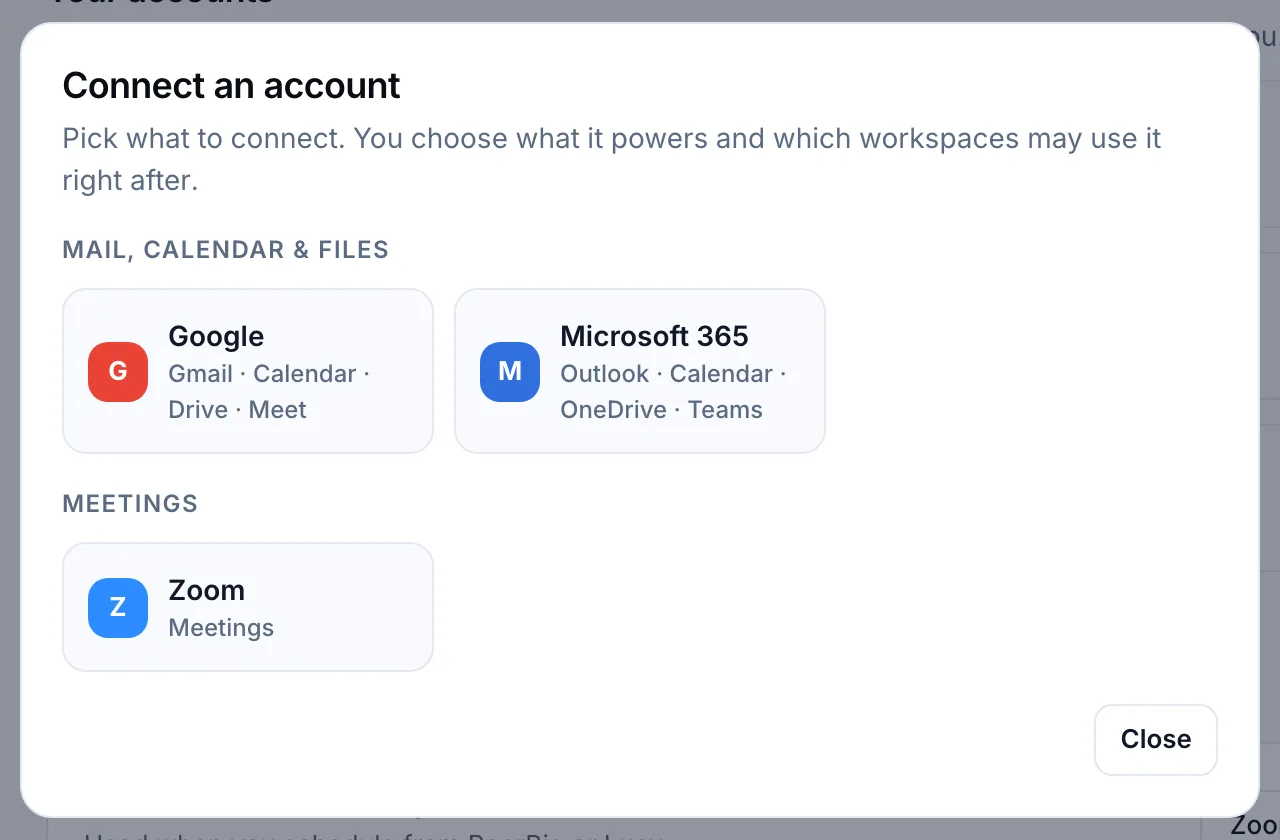
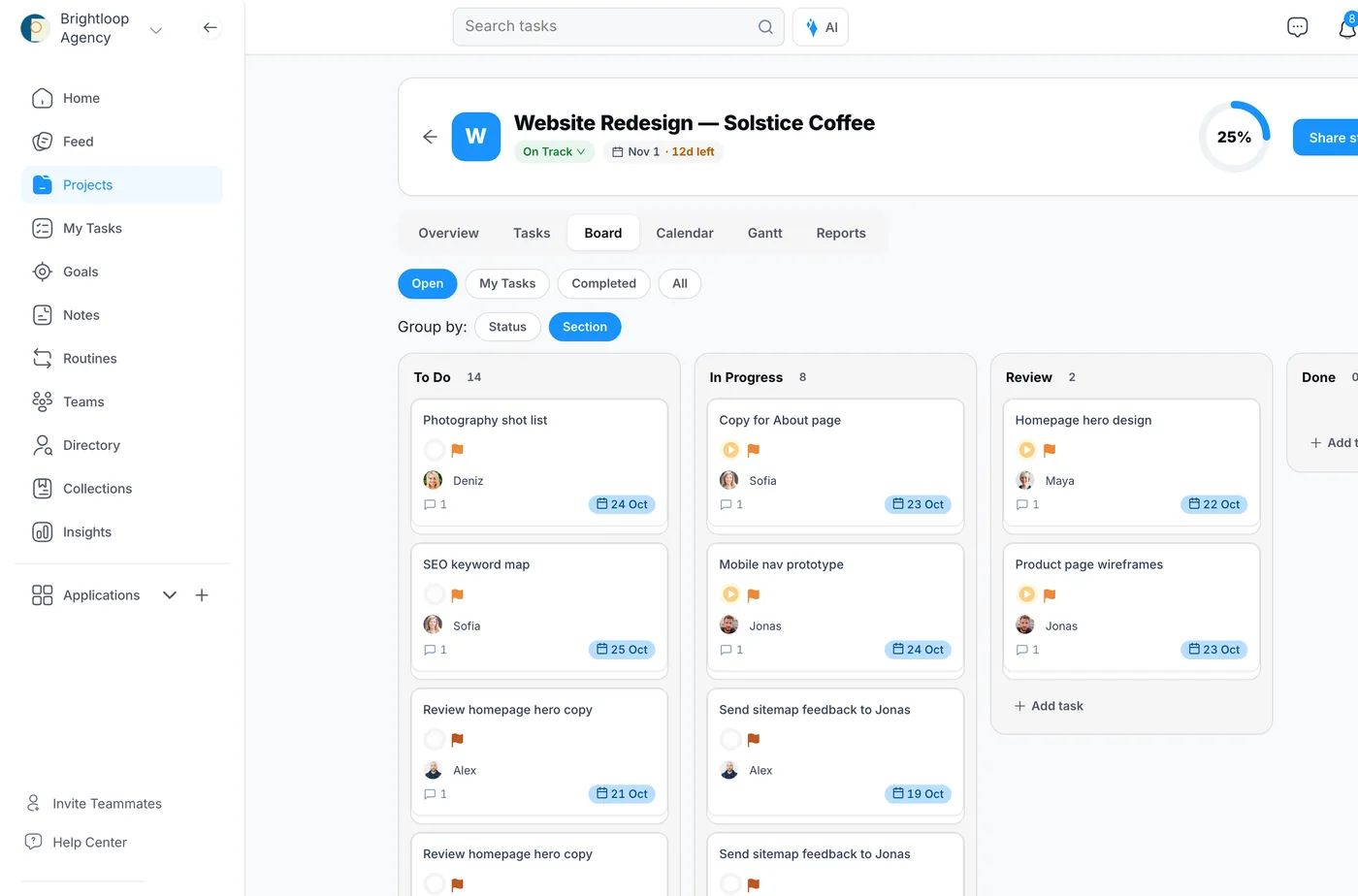
- Tasks and projects for the team: tasks with an owner, a due date and comments, in projects with list, board, calendar and Gantt views and a Reports tab; managers get a workload report showing open tasks per person.
- Gmail to tasks: with the Lucy AI add-on, ask “Which emails this week ask me for something? Turn them into tasks.” Lucy proposes each task with an owner and a date and creates them once you confirm. An email rule in Gmail can also start a workflow, on every plan.
- Google Meet: create Meet meetings from PeerBie on every plan; with the add-on, Lucy’s note-taker joins and her action items become tasks in one click.
- Drive, Docs and Sheets: Lucy answers questions from your Drive files and can write a Google Doc; on Pro, goals can take their key-result numbers from a Google Sheet.
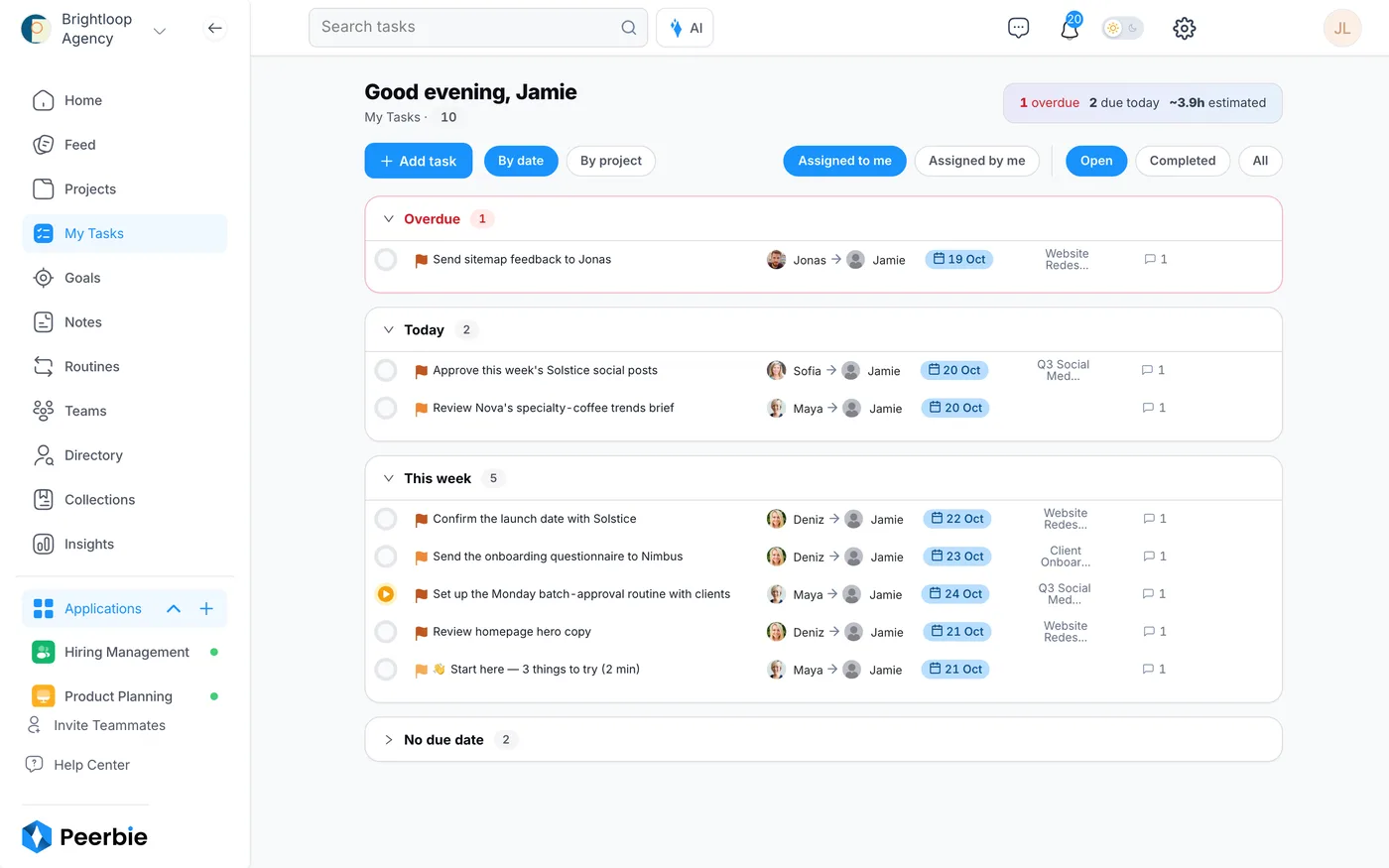
Every person also gets My Tasks: everything assigned to them across projects, grouped into overdue, today and this week. The tasks and projects guide shows how to set it up, and how to turn emails into tasks covers every Gmail route, including Google’s own.
What it costs: the Starter plan is free for up to 5 people (1,500 tasks). Basic is $10 and Pro $15 per user a month, billed annually. The Lucy AI add-on is $20 per user a month on Pro and above, with no credits; the 14-day PeerBie trial includes it. Full details are on the pricing page.
Where PeerBie is not the best fit
- You want tasks to stay inside Gmail’s side panel. PeerBie is a separate app (web, iPhone and Android). TasksBoard or the Asana add-on keep you closer to Gmail.
- You need PeerBie tasks to appear in Google Calendar. PeerBie reads your Google Calendar, but it does not sync tasks into it in both directions.
- It is just you. For a personal list, Google Tasks is free and already everywhere you work.
Frequently asked questions
Does Google Workspace have a task management tool?
Yes. Google Tasks is included in every Google Workspace plan and appears in the side panel of Gmail, Calendar, Chat, Drive, Docs, Sheets and Slides. Tasks can have dates, deadlines, repeats and subtasks. It has no board, project view or reporting, so teams that run projects often add a dedicated task tool.
Can you assign tasks to others in Google Workspace?
Yes, in two places. In a Google Chat space, open the Tasks tab and choose a space member. In a Google Doc, type @task or turn a checklist item into a task and choose someone in your domain; Google lists this as a premium feature on some Business and Enterprise plans. Shared tasks cannot have subtasks or repeat.
Can Google Tasks lists be shared?
Not as ordinary lists. Google Tasks lists are personal. The shared option is a Chat space’s Tasks tab, where every member sees the space’s tasks, or tasks assigned in a Doc. Add-ons such as TasksBoard add shared lists on top of Google Tasks.
Can I see my tasks in Google Calendar?
Yes. Tasks with a date appear in Google Calendar, and since late 2025 a task can block time with a start time and duration, plus a deadline in the all-day row. Calendar also has a full-screen Tasks view, opened from the Tasks icon at the top right.
Is Google Tasks good for team project management?
For a small team that works in one Chat space, it can be enough. It lacks what larger teams usually need: a board or Gantt view, priorities beyond a star, dependencies, and an overview of who is working on what. Those are the gaps add-ons and project tools fill.
Can Gemini create tasks in Google Workspace?
Yes. Since September 2026, Gemini can create a to-do list directly in Google Tasks from whichever Workspace app you are in, on Business Standard and Plus, Enterprise Standard and Plus, and Google AI Pro and Ultra plans. In Gmail you can also create a task from a Gemini summary of an email.
Try it with your Google account
Start PeerBie free for up to 5 people, or try Pro with the Lucy add-on free for 14 days, no credit card needed. You can also walk around the live demo workspace without signing up.
Features and prices checked on Google’s help pages and each vendor’s website on 23 October 2026. If you spot something out of date, tell us at [email protected].
