
ChatGPT for Project Management: How to Use It (and Claude) with Your Team’s Tasks
Most project managers already use ChatGPT or Claude for something: a first draft of a project plan, a status update, a list of risks nobody had written down. The harder question is what happens next. A plan in a chat window has no owners, no due dates and no reminders, and nobody else on the team can see it.
This guide covers how to use ChatGPT for project management, and Claude alongside it: the jobs both do well, where they stop, what each plan includes, how to connect them to the task tool your team already uses, and the rules to set before you give an AI assistant access to project data. Plans and features were checked on OpenAI’s and Anthropic’s own pages on 23 October 2026. We make PeerBie, a work platform with its own connector for both assistants, and we say where something else fits better. New to the assistant itself? Start with what ChatGPT is and how to use it.
Can ChatGPT be used for project management?
Yes, for the thinking and writing parts: plans, task breakdowns, status reports, risk lists and meeting summaries. ChatGPT and Claude are not project management tools on their own: they keep no shared task list, owners or deadlines. Connect them to a task tool so the assistant reads real project data and writes tasks everyone can see.
8 project management jobs ChatGPT and Claude do well
Both assistants are strong at turning messy input into structured output. These are the jobs where they save a project manager real time:
- Draft a project plan. Give the goal, the deadline and the team; get phases, milestones and a first list of tasks to edit.
- Break work down. Turn “launch the new website” into tasks small enough to assign and finish in a few days.
- Write status updates. Paste the week’s notes; get a short update for the client, a longer one for the team.
- List risks and assumptions. Ask what could delay the project, how likely each risk is and what would reduce it.
- Summarise meetings. From a transcript: decisions, open questions and action items with an owner and a date.
- Prepare stakeholder communication. A change request explained for the finance team, a delay explained for the client.
- Write documents. Project charters, RACI tables, acceptance criteria, retrospective questions.
- Check your own thinking. “Here is my plan. What is missing, and which estimate looks too optimistic?”
Where they stop: a chat is not a project
Used on their own, both assistants have the same limits, and they are worth knowing before you plan around them:
- No shared task list. A task in a chat has no assignee who gets notified, no due date anyone is reminded of and no status a manager can see.
- They only know what you give them. Without a connection to your tools, the assistant does not know that a task slipped yesterday unless someone pastes it in.
- Copy and paste is the hidden cost. Every plan the assistant writes has to be typed into the real task tool by someone, and kept in step from then on.
- They can be confidently wrong. A clean-looking schedule can still contain an impossible estimate or a date that falls on a holiday. A person has to own the plan.
Three ways to use ChatGPT or Claude on a project
| Set-up | How it works | Good for | Limit |
|---|---|---|---|
| 1. A plain chat | Paste notes in, copy the answer out. | One-off drafts: a plan, an email, a risk list. | Nothing is remembered between chats; everything is copied by hand. |
| 2. A project in the assistant | ChatGPT Projects and Claude Projects keep chats, files and instructions for one piece of work together. | A long project with a brief, a schedule and documents the assistant should always consider. | Still not a task list. Sharing with colleagues depends on the plan (see the table below). |
| 3. A connector to your task tool | The assistant reads and, if you allow it, writes in your project tool through a connector (an MCP server). | Status questions on live data (“what is overdue?”) and turning a plan into real, assigned tasks. | Needs a task tool with a connector, the right assistant plan, and care with permissions. |
Option 3 is where the copy and paste stops. You ask “which tasks on the website project are overdue, and who owns them?” and the answer comes from the project tool itself, not from what someone remembered to paste in.
ChatGPT vs Claude for project management: plans and limits
Both are capable at planning and writing; for most teams the difference that matters is in sharing, connectors and data use, which depend on the plan.
| ChatGPT | Claude | |
|---|---|---|
| Individual paid plan | Plus $20 a month | Pro $20 a month, or $17 a month billed annually |
| Team plan | Business: $20 per user a month billed annually ($25 monthly), teams of 2–200 | Team: $20 per user a month billed annually ($25 monthly) |
| Projects | On every plan, including Free; projects can be shared with colleagues (Chat or Edit access) | Up to 5 on Free, unlimited on paid plans; sharing a project needs Team or Enterprise |
| Ready-made app connections | Yes, for example Asana, Atlassian Rovo, Linear, monday.com, Notion, Trello, Gmail, Google Drive, Outlook, SharePoint, Slack (depends on plan and workspace) | Yes, a directory that includes Asana, Atlassian (Jira, Confluence), ClickUp, Linear, monday.com, Notion, Smartsheet, Trello, Wrike, Google and Microsoft 365 |
| Your own connector (custom MCP) | Full read and write on Business, Enterprise and Edu (web, added by an admin); read-only on Pro | On every plan; Free is limited to one custom connector; on Team, owners add them |
| Is your content used for training? | Free, Go, Plus, Pro: yes unless you opt out. Business, Enterprise, Edu: not by default | Free, Pro, Max: yes unless you opt out. Team, Enterprise, API: no |
Two notes. OpenAI retired the old “agent mode”; longer multi-step work now runs in ChatGPT Work. And both companies warn that a connected app can carry hidden instructions in its content (prompt injection), so they ask you to connect only servers you trust. See OpenAI’s Projects in ChatGPT and Anthropic’s custom connectors guide for the details.
How to connect ChatGPT or Claude to your project tool
Most project tools now publish an official MCP server that both assistants can use. Each one signs you in with your own account, so the assistant only sees what you can see:
- Asana: create and manage tasks and projects in plain language.
- Jira and Confluence (Atlassian): search and summarise, create and update work items, with your existing Atlassian permissions.
- Linear: find, create and update issues, projects and comments.
- monday.com: read and write board data: create items, update columns, query boards.
- ClickUp: tasks, lists, docs, time tracking and comments, on every ClickUp plan, with daily call limits that depend on the plan.
- Notion: read, create and update pages and databases.
The steps are similar everywhere: in Claude, open the connector directory (or add a custom connector with the tool’s server address) and sign in. In ChatGPT, turn on the app if it is in the list; for a server that is not, an admin on Business or Enterprise adds it as a custom connector in developer mode.
12 ChatGPT and Claude prompts for project managers
The first eight work in any chat. The last four need a connection to your task tool, because they ask about live data.
- “We need to launch [project] by [date] with [team]. Draft phases, milestones and the first 20 tasks, each small enough to finish in three days.”
- “Here is the plan. Which three estimates look most optimistic, and why?”
- “List the risks for this project with likelihood, impact and one way to reduce each. Table format.”
- “Write a RACI table for these tasks and roles.”
- “From this meeting transcript, list decisions, open questions and action items with owner and due date. Mark anything without an owner.”
- “Turn these notes into a five-line status update for the client. Lead with what changed since last week.”
- “The launch moves two weeks. Draft the message to the client: reason, new date, what we are doing about it.”
- “Write ten retrospective questions for a project that finished late but on budget.”
- “What is overdue on the [project] project, and who owns each task?”
- “Which of our goals are at risk this quarter, and which tasks are behind them?”
- “Create the action items from yesterday’s meeting as tasks, assigned and dated as agreed.”
- “Summarise what my team finished this week and what is blocked, for Monday’s meeting.”
5 rules before you give an AI assistant your project data
- Start read-only. Let the assistant answer questions for a week before you allow it to create or change anything.
- Keep confirmations on. Both assistants can ask before every change. Leave that on for anything that assigns work to other people.
- Check the training setting. On personal plans, turn off model training for work content, or use a business plan where it is off by default.
- Keep one source of truth. The task tool is the record; the chat is the conversation about it. A task that exists only in a chat does not exist.
- A person owns every task. The assistant can propose an owner and a date. A human agrees to them.
Adoption is still early. In PMI’s report Shaping the Future of Project Management With AI (2023), 21% of respondents said they were using AI in project management, while 82% of senior leaders said AI would affect how projects are run. Rules like these are what let a team move from the first number to the second safely.
Using ChatGPT and Claude with PeerBie
PeerBie is a work platform where a team’s tasks, projects, goals, chat and meetings live together. Its connector for Claude and ChatGPT lets either assistant work with your real PeerBie data, as you and with your own permissions.
- Read: your tasks by due date, status or priority; projects with progress; goals with pace and risk; your meeting notes with their action items; your next days from the connected Google or Outlook calendar; workflows; the feed.
- Change, only if you allow it: create a task, change its status, due date or assignee, add a comment, log a key-result check-in, start a workflow. Claude and ChatGPT ask you before each change, and there are no delete tools at all.
- Privacy: one workspace per connection, an access token that lasts one hour, and PeerBie does not receive your conversation with the assistant or use connector data to train AI models.
Setup in Claude: Customize → Connectors → Add custom connector, name it PeerBie, enter the server address from our PeerBie connector page for Claude and ChatGPT, then sign in to PeerBie and choose Read only or Read and change. It works on every Claude plan, including Free, which allows one custom connector. In ChatGPT it is added in developer mode (Business, Enterprise and Edu; read-only on Pro) until it is listed in ChatGPT’s directory. Any PeerBie account can connect, including the free plan.
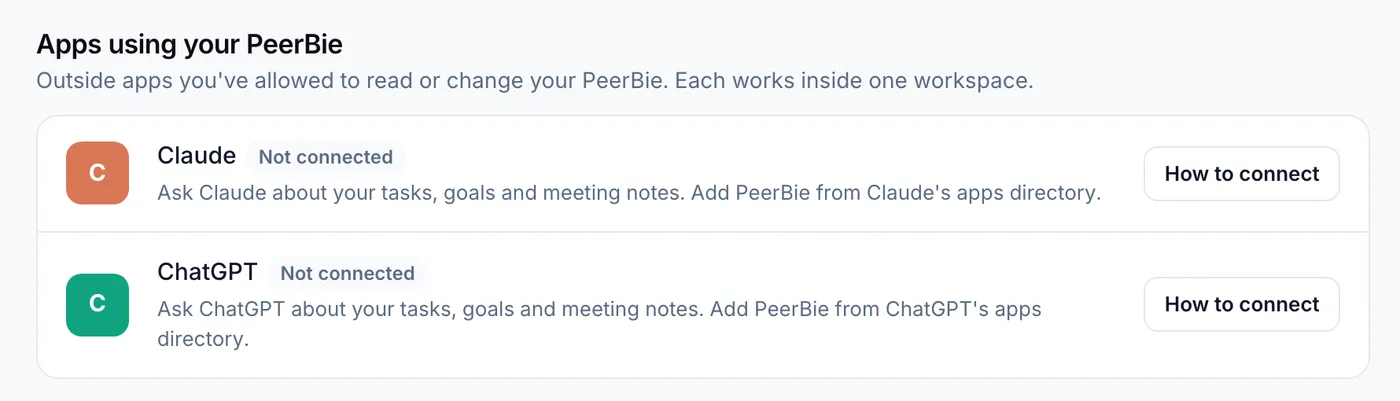
Then ask in plain words, in Claude or ChatGPT: “What is overdue for me in PeerBie, and what is due this week?”, “How is the Website relaunch project going?”, or “Create a task to send the proposal to Harbor Coffee by Friday.” The task appears in PeerBie, in the project, with its owner notified like any other task.
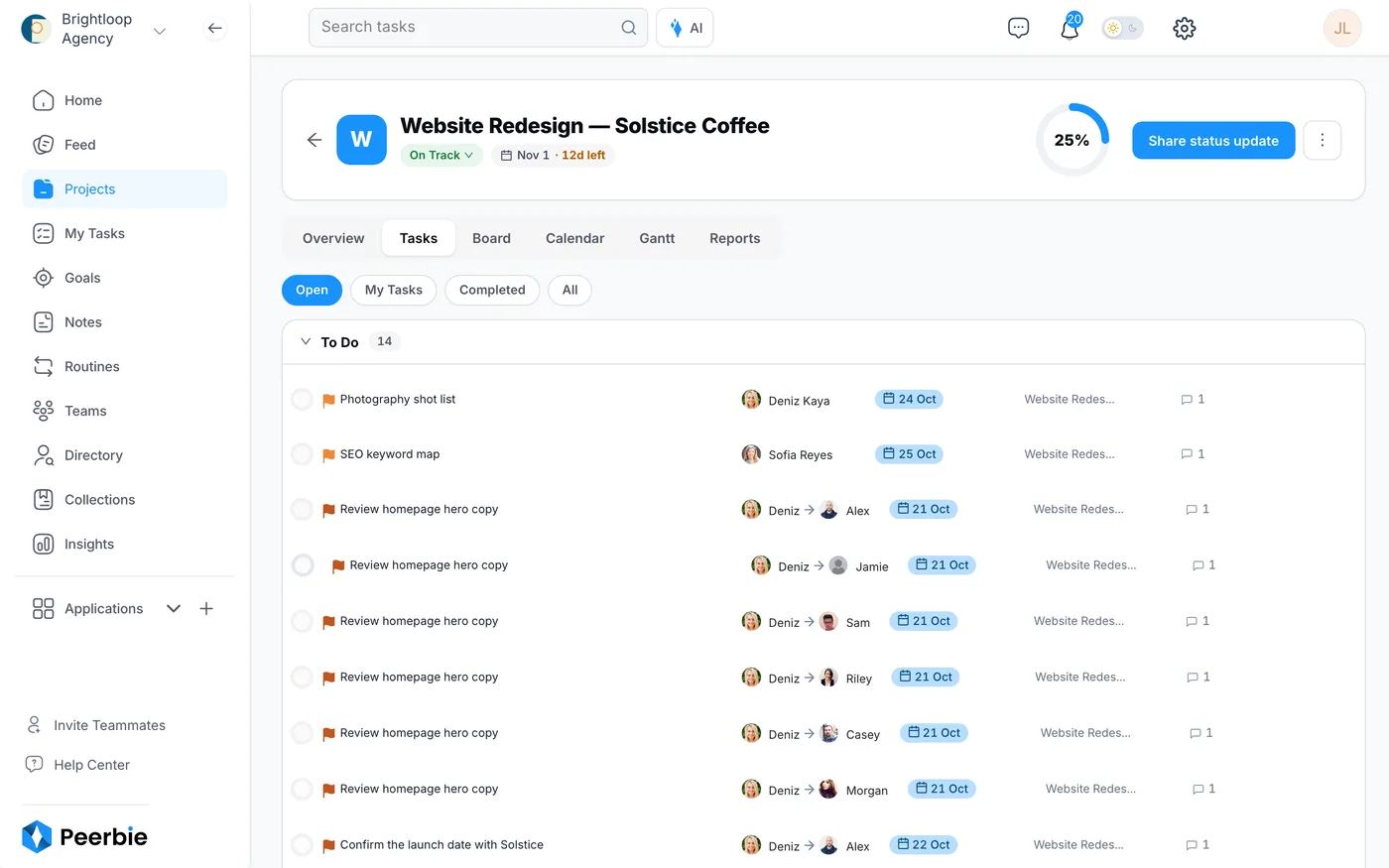
Or ask Lucy inside PeerBie
If you would rather not leave PeerBie, Lucy, the AI assistant built into it, answers the same questions next to the work, and also reads your Gmail or Outlook, joins Zoom, Meet and Teams calls to take notes, and sends a morning brief. Lucy comes with the Lucy AI add-on: $20 per user a month on Pro ($15) and above, with no credits; the 14-day PeerBie trial includes it. The guide to what to ask Lucy has example questions, and our ChatGPT vs PeerBie and Claude vs PeerBie comparisons explain when each fits.
Where PeerBie is not the best fit
- Your team is settled in Jira, Asana or Linear. Connect ChatGPT or Claude to that tool’s own MCP server instead; moving your projects only to get an AI connection is not worth it.
- You need heavy scheduling. Resource levelling and critical-path planning are better served by dedicated scheduling software.
- You want PeerBie inside ChatGPT on Plus. ChatGPT allows custom connectors with changes only on Business, Enterprise and Edu today; on Plus, use Claude or Lucy.
Frequently asked questions
Can ChatGPT be used for project management?
Yes, for planning and writing: project plans, task breakdowns, status updates, risk lists and meeting summaries. It is not a project management tool on its own, because it keeps no shared task list, owners or deadlines. Connect it to your task tool so it reads live data and creates tasks where the team can see them.
Is Claude better than ChatGPT for project management?
Both are strong at plans, breakdowns and summaries. The practical differences are in the plans: ChatGPT lets you share projects on every plan, while Claude needs Team or Enterprise for that; Claude allows a custom connector on every plan, while ChatGPT allows custom connectors with write access only on Business, Enterprise and Edu.
Can Claude act as a project manager?
Claude can do much of a project manager’s writing and analysis, and with a connector it can read and update tasks in tools such as Asana, Jira, Linear or PeerBie. It does not decide priorities, own deadlines or talk to stakeholders for you. Keep a person accountable for the plan and for every task it creates.
How do I connect ChatGPT or Claude to Asana, Jira or my task tool?
Use the tool’s official connector. Asana, Atlassian (Jira and Confluence), Linear, monday.com, ClickUp and Notion all publish one. In Claude, add it from the connector directory or as a custom connector; in ChatGPT, turn on the app, or have a Business or Enterprise admin add it in developer mode.
Is it safe to put project data into ChatGPT or Claude?
It can be, with the right settings. On personal plans, both companies may use your content for training unless you opt out; on ChatGPT Business and Enterprise and Claude Team and Enterprise, they do not by default. Start connectors in read-only mode, keep confirmations on and connect only servers you trust.
Will AI replace project managers?
Not soon. AI is taking over data collection, tracking and first drafts of reports, but someone still has to agree on scope, make trade-offs and keep people committed. In PMI’s 2023 research, 21% of respondents used AI in project management, while most expected it to change the job rather than remove it.
Try it with your own projects
Start PeerBie free and connect Claude or ChatGPT in a few minutes, or walk around the live demo workspace without signing up. Setup steps for both assistants are on the Claude and ChatGPT connector page.
Plans, prices and features checked on OpenAI’s and Anthropic’s websites on 23 October 2026. Both change often; if you spot something out of date, tell us at [email protected].
