
Task Management in Microsoft 365: Planner, To Do, Teams, and When You Need More
Microsoft 365 has more places to keep a task than most people realise: Planner, To Do, Outlook flags, Teams messages, Loop lists, meeting recaps and, until recently, Project. Since 2024 most of them meet in a single Planner app, but which features you get depends on the licence you pay for.
This guide explains what each part does in 2026, what it costs, the limits teams actually hit, and the point where a separate work platform starts to make sense. Microsoft details were checked on Microsoft’s own pages on 20 October 2026. We make PeerBie, which works alongside Microsoft 365, and we say plainly where Microsoft’s own tools are the better choice.
The short version
- Your own tasks: To Do (personal lists, My Day, flagged Outlook emails).
- A team’s shared tasks: Planner, included in Microsoft 365 business plans.
- Timelines, dependencies, goals and sprints: Planner Plan 1 ($10 per user a month) or Plan 3 ($30).
- Tasks from conversations: create a Planner task from a Teams message, or use a Loop task list.
- AI meeting recaps with suggested tasks: Teams Premium ($10) or Microsoft 365 Copilot (Copilot Business lists at $21 for up to 300 users).
- Tasks, chat, meetings that turn into tasks and goals in one place, still connected to Outlook and Teams: a work platform such as PeerBie.
One Planner app, many sources of tasks
The Planner app in Teams (and on the web) brings together what used to be To Do, Planner and Project for the web. It has four main views:
- My Day: tasks due today plus anything you pin for today.
- My Tasks: your private tasks, tasks assigned to you from Planner, Loop and Teams meeting notes, and emails you flagged in Outlook.
- My Plans: your To Do lists, basic plans and premium plans.
- Shared plans: the team boards everyone works in.
| Where the task starts | Where it shows up | Who sees it | Licence needed |
|---|---|---|---|
| Flag an email in Outlook | To Do and My Tasks → Flagged emails | Only you | Any plan with Exchange Online |
| Add a task to a Planner plan | The plan, plus the assignee’s My Tasks | Plan members | Included in Microsoft 365 |
| “Create Planner task” on a Teams message | Your private tasks or a plan you choose | You, or plan members | Included |
| A task in a Loop component or meeting notes | Assignee’s My Tasks | People with the Loop page | Loop is in Business Standard and Premium |
| AI-recommended tasks in a meeting recap | The recap in Teams | Meeting participants | Teams Premium or Microsoft 365 Copilot |
| A premium plan with timeline and dependencies | The premium plan | Plan members | Planner Plan 1 or Plan 3 |
To Do: your personal list
To Do is the right place for your own work: personal lists, a My Day view each morning, and flagged Outlook emails that appear as tasks automatically. You can share a list with colleagues in the same organisation, but there are no boards, buckets or reports. It is a to-do list, not a team tracker.
Planner (basic): included with Microsoft 365
Every Microsoft 365 business plan includes basic Planner: shared plans with buckets, assignees, due dates, checklists, labels and file attachments, in Grid, Board, Schedule and Chart views. Recurring tasks work (daily, weekly, monthly, yearly or custom). For many small teams this is enough, and it costs nothing extra.
Limits teams hit in basic Planner
- 9,000 tasks per plan, of which 3,000 can be open at once, and 20 checklist items per task.
- No timeline (Gantt) view, no goals, no sprints, and you cannot create dependencies; those are premium features.
- No time tracking in any Planner tier; premium adds effort and duration estimates only.
- Seeing work across plans is limited to your own tasks; portfolios need Plan 1 (to view) or Plan 3 (to create).
Planner premium: Plan 1 and Plan 3
| Tier | Price (per user / month, paid yearly) | What it adds |
|---|---|---|
| Planner (basic) | Included in Microsoft 365 | Shared plans, boards, charts, recurring tasks, My Day and My Tasks |
| Planner Plan 1 | $10 | Timeline (Gantt), creating dependencies, goals, milestones, sprints and backlogs, sub-tasks, custom fields, viewing portfolios |
| Planner and Project Plan 3 | $30 | Everything in Plan 1, plus creating portfolios, baselines, critical path, task history and Project desktop |
| Microsoft 365 Copilot (add-on) | $30; Copilot Business $21 list for up to 300 users | Copilot in Planner, the Planner agent for simple tasks, AI status reports |
If you came here from Microsoft Project: Project for the web retired on 1 August 2025 and its features moved into Planner premium. Project Online retired on 30 September 2026. Project desktop and Project Server continue. Our Microsoft Project vs PeerBie comparison covers that move in detail.
Teams: tasks from chats and meetings
Inside Teams you can turn any chat message into a Planner task (More actions → Create Planner task), choose the plan, bucket and assignee, and track it in the Planner app. Loop task lists in chats and meeting notes also send assigned tasks to each person’s My Tasks.
Meetings are where most teams lose tasks. Teams’ intelligent recap lists AI-recommended tasks, but it needs Teams Premium ($10 per user a month) or a Microsoft 365 Copilot licence. Even then, the recap is a suggestion list in Teams; check how your Copilot setup handles turning those suggestions into Planner tasks before you count on it.
What a full Microsoft 365 task stack costs
List prices after Microsoft’s 1 July 2026 price change, per user a month, paid yearly: Business Basic $7, Business Standard $14, Business Premium $22. On top of that:
| What you want | What to add | Extra per user / month |
|---|---|---|
| Shared team tasks and boards | Nothing: basic Planner is included | $0 |
| Timelines, dependencies and goals | Planner Plan 1 | $10 |
| AI meeting recaps with suggested tasks | Teams Premium, or Copilot | $10, or $21–30 |
| AI that drafts plans and status reports | Microsoft 365 Copilot | $21 (Business) to $30 |
The honest conclusion: if your team only needs shared lists and boards, basic Planner is already paid for and hard to beat. The bill grows once you want timelines, goals and AI meeting follow-up, because each comes from a different licence.
Signs you need more than Planner
- Decisions live in Teams chat, tasks live in Planner, and nobody connects the two.
- Meeting action items are copied by hand, or not at all.
- You need to know hours and cost per project, which Planner does not track.
- Goals are in a slide deck, disconnected from the work.
- Managers cannot see who is overloaded across several plans without premium licences.
How PeerBie works with Microsoft 365
PeerBie is a work platform for tasks, goals, team chat, a company feed and meetings, with an AI assistant, Lucy, as an add-on. It does not replace Outlook, Teams or OneDrive; it connects to them. It does replace Planner for team task tracking: PeerBie does not sync with Planner or To Do.
Outlook mail and calendar
With the Lucy add-on, each person connects their own Microsoft account. Lucy reads your inbox when you ask, sums up long threads, drafts replies and turns requests into PeerBie tasks; she sends only after you approve. She reads your Outlook calendar for your morning brief and adds events for you.
Teams meetings that end in assigned tasks
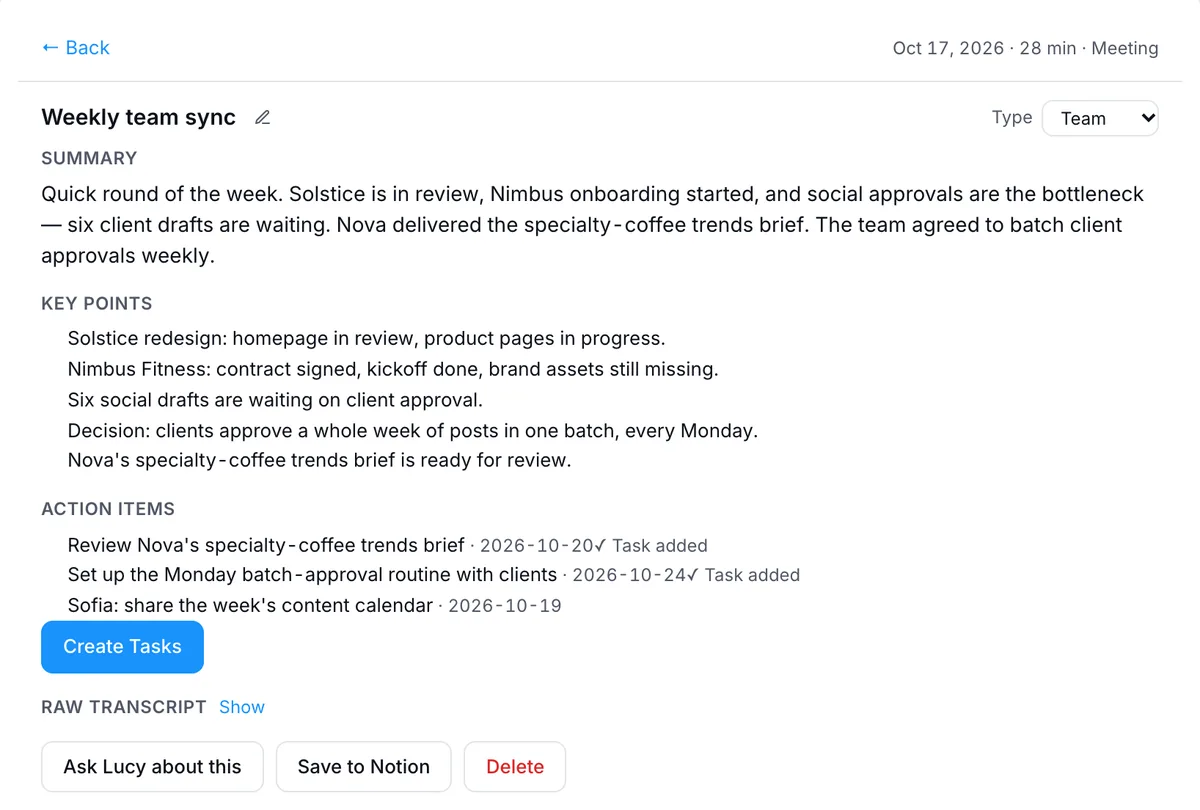
Create a Teams meeting from a PeerBie post or ask Lucy to set one up; it goes on your own Outlook calendar. Turn on the note-taker and it joins your Teams (and Zoom and Google Meet) calls on your calendar, then files the summary, decisions and action items. You check the owners and dates, and they become PeerBie tasks. See meetings and notes.
Files in OneDrive and SharePoint
Ask about a file and Lucy finds it in your OneDrive, reads it and answers; she does not scan your drive in the background. AI employees, which a workspace admin connects, can search SharePoint, create Word and Excel files, and post updates to a Teams channel.
What you get that Planner basic does not have
- Time tracking (start, pause, done), timesheets and project cost from time × rate. See projects and tasks.
- Goals and OKRs on every paid plan, from company to person, with key results that can update from tools such as HubSpot, Stripe, Excel and Jira. See Goals & OKRs.
- Team chat, a company feed and Huddles (audio rooms with screen share on the web) next to the tasks.
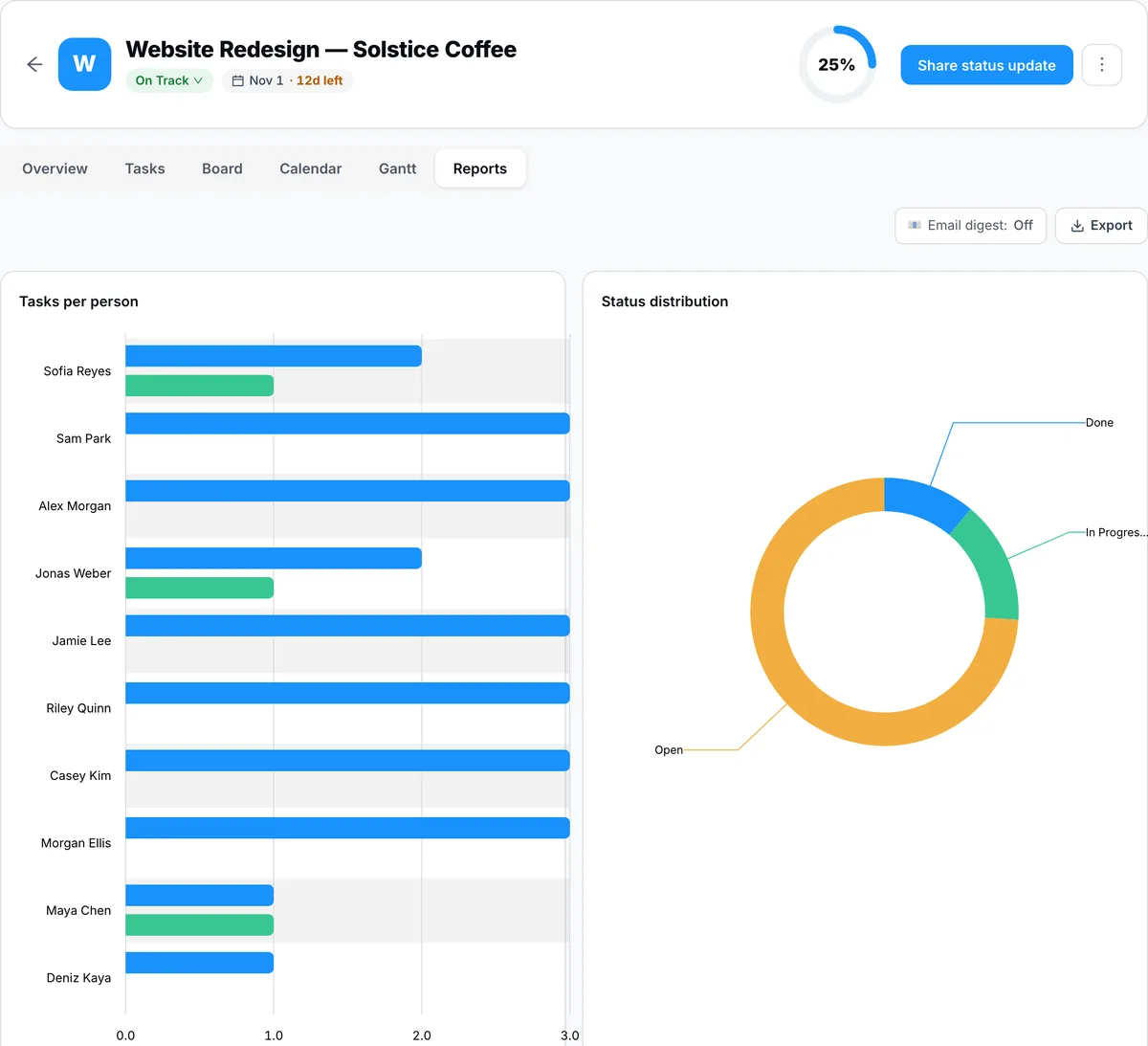
- Project reports that show open and completed tasks per person.
For IT
PeerBie Inc is a Microsoft verified publisher. A Microsoft 365 admin can approve PeerBie once for the company; each person still signs in to connect their own account, and write permissions for AI employees are granted separately, one tool at a time. Enterprise plans add SAML single sign-on and SCIM. PeerBie is hosted in Germany; AI features are processed by providers in the US, listed on our security page. Full details: PeerBie and Microsoft 365.
Where Microsoft’s own tools are better
- Price, if you only need lists and boards: basic Planner is already included.
- Heavy scheduling: PeerBie has no timeline (Gantt) view, dependencies, baselines or critical path; Planner Plan 1 and Plan 3 do.
- Staying in one vendor: Planner lives inside Teams and Entra ID with no extra app to approve.
- Workflows from Outlook email: PeerBie’s email-rule workflow triggers work with Gmail only today.
- No desktop app: PeerBie runs on the web, iPhone and Android.
Pricing: PeerBie Basic is $10 and Pro $15 per user a month, paid yearly; the Lucy add-on is $20 per user a month on Pro and above. There is a free plan for up to 5 people. See pricing.
Frequently asked questions
What is the difference between Microsoft Planner and To Do?
To Do is for your own tasks: personal lists, My Day and emails you flag in Outlook. Planner is for shared team plans with buckets, assignees, boards and charts. Since 2024 both appear in one Planner app, where My Tasks shows your To Do tasks and everything assigned to you in Planner.
Is Microsoft Planner free?
Basic Planner is included in Microsoft 365 business plans (Business Basic, Standard and Premium). Premium features such as timeline (Gantt) views, creating dependencies, goals, sprints and portfolios need Planner Plan 1 ($10 per user a month, paid yearly) or Planner and Project Plan 3 ($30).
Do Teams meeting action items become Planner tasks automatically?
Not by default. Intelligent recap, which lists AI-recommended tasks, needs Teams Premium ($10 per user a month) or a Microsoft 365 Copilot licence, and someone still has to turn the suggestions into Planner tasks unless your company uses Copilot’s meeting agents. You can create a Planner task from any Teams chat message by hand.
What replaced Microsoft Project for the web and Project Online?
Project for the web retired on 1 August 2025, and its features moved into Planner premium plans. Project Online retired on 30 September 2026. Project desktop and Project Server continue.
Does PeerBie sync with Microsoft Planner or To Do?
No. PeerBie replaces Planner for team task tracking rather than syncing with it. It works with the rest of Microsoft 365: Lucy reads and answers Outlook mail with your approval, uses your Outlook calendar, creates Teams meetings and takes notes in them, and reads OneDrive files you ask about.
Try it next to your Microsoft 365
Start a free PeerBie workspace, connect your Microsoft account, and run one team’s tasks and meetings in it for two weeks. Or walk around the live demo first.
Microsoft prices and features checked on microsoft.com and Microsoft Learn on 20 October 2026. Microsoft changes licensing often; check before you buy.
