
Trello Alternatives: 9 Tools Compared on Price, Views and AI
Trello is still the quickest way to get a team’s work onto a board: lists, cards, drag and drop. Teams usually start looking for an alternative for one of three reasons. The free plan stops at 10 collaborators. The calendar and timeline views sit on the Premium plan. Or the team has grown and the work around the board (chat, meetings, goals, reports) is now spread over four other apps.
This guide compares nine alternatives on the things that decide a switch: what the free plan really includes, the price per person, whether you get a timeline or Gantt view, whether the team can talk inside the tool, and how AI is priced. Prices were checked on each vendor’s own pricing page on 22 October 2026. One of the tools is ours (PeerBie); we say plainly where Trello or another tool is the better choice.
The short answer
- You like Trello and just need more views: stay on Trello and move to Premium ($10 per user a month, billed annually).
- Projects with dates and dependencies: Asana, or Microsoft Planner if you already pay for Microsoft 365.
- Many features for the lowest price: ClickUp.
- Flexible boards and dashboards: monday.com.
- Documents and wiki first, tasks second: Notion.
- Software teams: Jira.
- A flat price instead of per-user fees: Basecamp.
- Boards plus team chat, meetings that become tasks, goals and an AI assistant in one place: PeerBie.
What Trello gives you today, and where it stops
From trello.com/pricing on 22 October 2026:
| Plan | Price per user a month | What you get |
|---|---|---|
| — | — | — |
| Free | $0 | Up to 10 collaborators and 10 boards per Workspace, 250 automation runs a month, 10 MB per file, the Inbox |
| Standard | $5 billed annually, $6 monthly | Unlimited boards, 1,000 automation runs, Planner, single-board guests, AI summaries and AI board creation |
| Premium | $10 billed annually, $12.50 monthly | Calendar, Timeline, Table, Dashboard and Map views; unlimited automation runs |
| Enterprise | $17.50 billed annually | Admin and security controls, multi-board guests, unlimited Workspaces |
So the common reasons to leave are specific:
- The 11th person. Since April 2024, a free Workspace holds 10 collaborators, guests and pending invites included.
- Dates. Calendar and Timeline are Premium views; on Free and Standard, dates live on cards, not in a plan you can see.
- The work around the board. Trello has card comments, but no team chat, no meeting notes, no goals and no project reports. Those end up in Slack, Zoom, a spreadsheet and a slide deck.
If only the first two apply, Trello Standard or Premium may be the cheapest fix. If the third one does, read on.
Nine Trello alternatives compared
| Tool | Free plan | Paid from (per user a month) | Timeline or Gantt | Team chat built in | AI |
|---|---|---|---|---|---|
| — | — | — | — | — | — |
| Asana | 2 users | $10.99 annual, $13.49 monthly | From Starter | Messages, not a full chat | Included on paid plans, with monthly limits |
| monday.com | 2 seats, 3 boards | $9 annual (Basic) | From Standard ($12) | Not checked | Monthly AI credits on paid plans |
| ClickUp | Unlimited members, 60 MB | $7 annual, $10 monthly | Paid plans (trial on Free) | Yes | Credits included, also on Free |
| Notion | Yes, limited for teams | $10 annual (Plus) | Not checked | No | Notion AI on Business ($20) |
| Jira | 10 users | Varies with team size; check the calculator | Timeline on every plan | No | Rovo credits on paid plans |
| Microsoft Planner | Basic plans included in Microsoft 365 business plans | Plan 1 $10, paid yearly | Plan 1 and up | Through Teams | Needs a Microsoft 365 Copilot licence |
| Basecamp | 1 project | Flat price: Pro $79 a month for up to 10 users | No | Yes (Campfires and Pings) | Connects to ChatGPT and Claude; no built-in AI |
| Wrike | Unlimited users, board and table views | $10 (Team, 2–15 users), billed annually | From Team | No | From Team |
| PeerBie | 5 people, 3 projects, 1,500 tasks | $10 annual (Basic), $13 monthly | Gantt view | Yes, plus a company feed and audio rooms | Lucy add-on, $20 on Pro and above, no credits |
The alternatives, one by one
Asana
The most complete classic project manager: timelines, Gantt, dependencies, portfolios and goals on the higher plans. The catch for teams coming from Trello’s free plan is that Asana’s free Personal plan now covers two users, so a team pays from day one: Starter is $10.99 billed annually. AI is included on paid plans with a monthly allowance. Our Asana alternatives guide goes deeper.
monday.com
Very flexible boards that you shape into almost any process, with good dashboards. Timeline and Gantt start on Standard ($12 per seat billed annually), and AI works on monthly credits that grow with the plan. Check the minimum number of seats for your plan before you compare prices. More in our monday.com alternatives guide.
ClickUp
The most features per dollar: lists, boards, Gantt, docs, chat, whiteboards and AI credits, from $7 per user billed yearly, and a free plan with no member limit. The cost is complexity: teams leaving Trello for simplicity sometimes find ClickUp the opposite. See our ClickUp alternatives guide.
Notion
Best when the team’s knowledge matters as much as its tasks: documents, wikis and databases you can view as a board. Notion AI is on the Business plan ($20 per seat billed yearly). There is no chat between people, and project tracking takes more setting up than in a dedicated tool. We compare it with PeerBie in Notion vs PeerBie.
Jira
Built for software teams: sprints, backlogs, bug tracking and a timeline on every plan, free for up to 10 users. Outside software it can feel heavy. Atlassian prices Jira with a calculator that changes with team size and billing, so check the price for your exact team.
Microsoft Planner
If your company already pays for Microsoft 365, basic Planner is included: board, grid, schedule and charts, with Teams as the chat around it. Timeline (Gantt) and goals need Planner Plan 1 ($10, paid yearly), and the AI in Planner needs a Microsoft 365 Copilot licence on top. Our guide to task management in Microsoft 365 explains the options.
Basecamp
The calm option: to-dos, message boards, a schedule, docs and chat in each project, at a flat price instead of per user (Pro is $79 a month for up to 10 users; Pro Unlimited is $199 a month billed annually). No Gantt, and no built-in AI, although it connects to ChatGPT and Claude.
Wrike
A strong choice for teams that run many projects with resource planning and approvals. The free plan has unlimited users but only board and table views; Gantt and AI start on Team ($10 per user, 2–15 users, billed annually). Business and above are billed annually only.
MeisterTask
A Kanban tool close to Trello in spirit, with a free plan for unlimited members and 3 projects. Pro is $12.50 per user billed yearly ($15.50 monthly); the timeline view starts on Business ($24). A good pick if you want a board, a little more structure and nothing else.
What ten people pay in a year
| Tool and plan | Per user a month (annual) | 10 users, 12 months |
|---|---|---|
| — | — | — |
| Trello Standard | $5 | $600 |
| ClickUp Unlimited | $7 | $840 |
| Trello Premium | $10 | $1,200 |
| Notion Plus | $10 | $1,200 |
| Wrike Team | $10 | $1,200 |
| PeerBie Basic | $10 | $1,200 |
| Asana Starter | $10.99 | $1,318.80 |
| monday.com Standard | $12 | $1,440 |
| MeisterTask Pro | $12.50 | $1,500 |
| PeerBie Pro | $15 | $1,800 |
| PeerBie Pro + Lucy AI add-on | $35 | $4,200 |
Trello is the cheapest here, and for a team that only needs a board it should stay that way. The comparison changes once you count the other tools the team pays for next to it: chat, a meeting note-taker, an OKR tool.
How PeerBie compares with Trello
PeerBie is a work platform where the board is one part of the day: tasks and projects, team chat, a company feed, meetings and goals in one app on the web, iPhone and Android, with an AI team led by Lucy. The full head-to-head is on Trello vs PeerBie.
Boards, and the other views
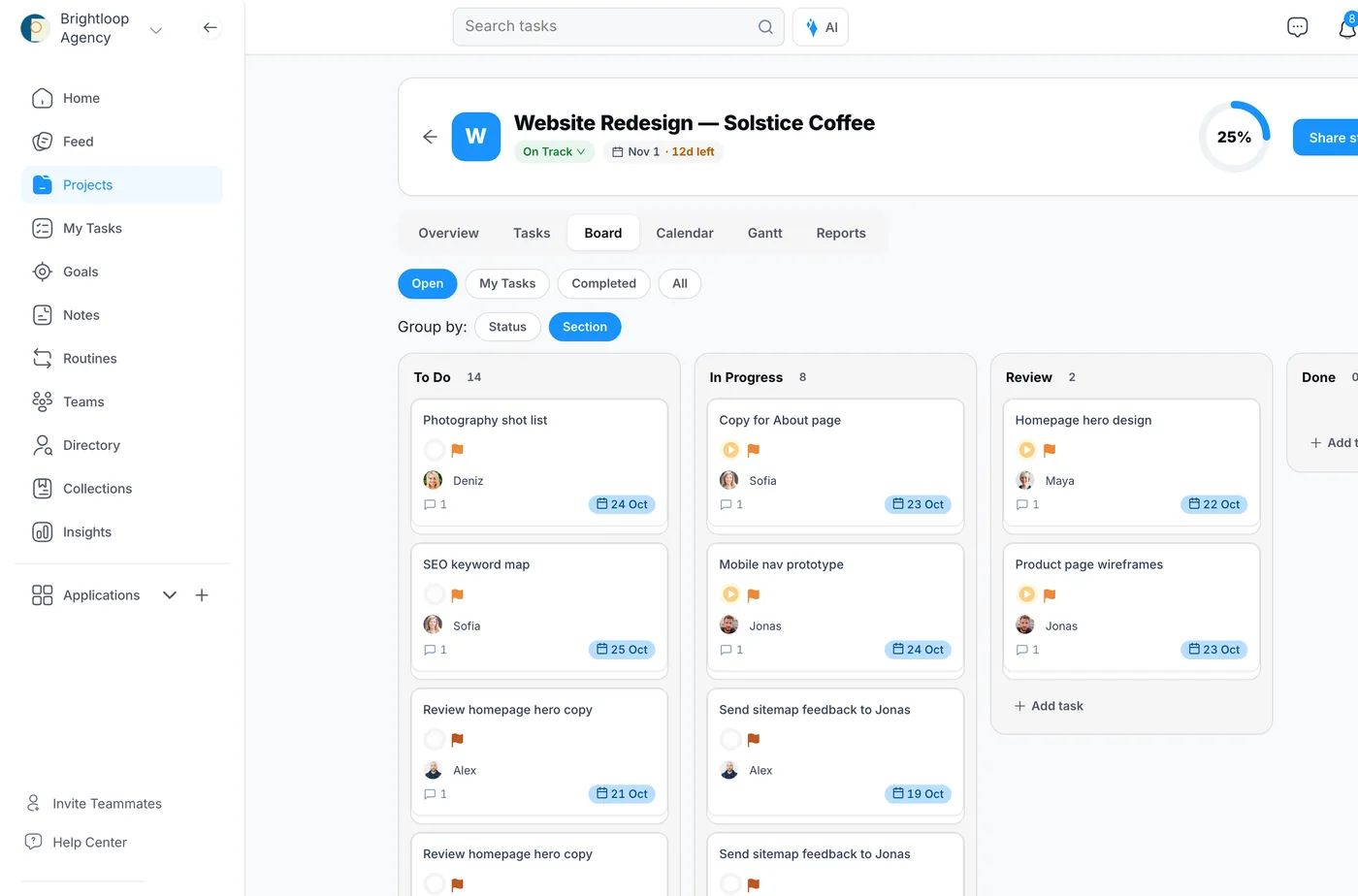
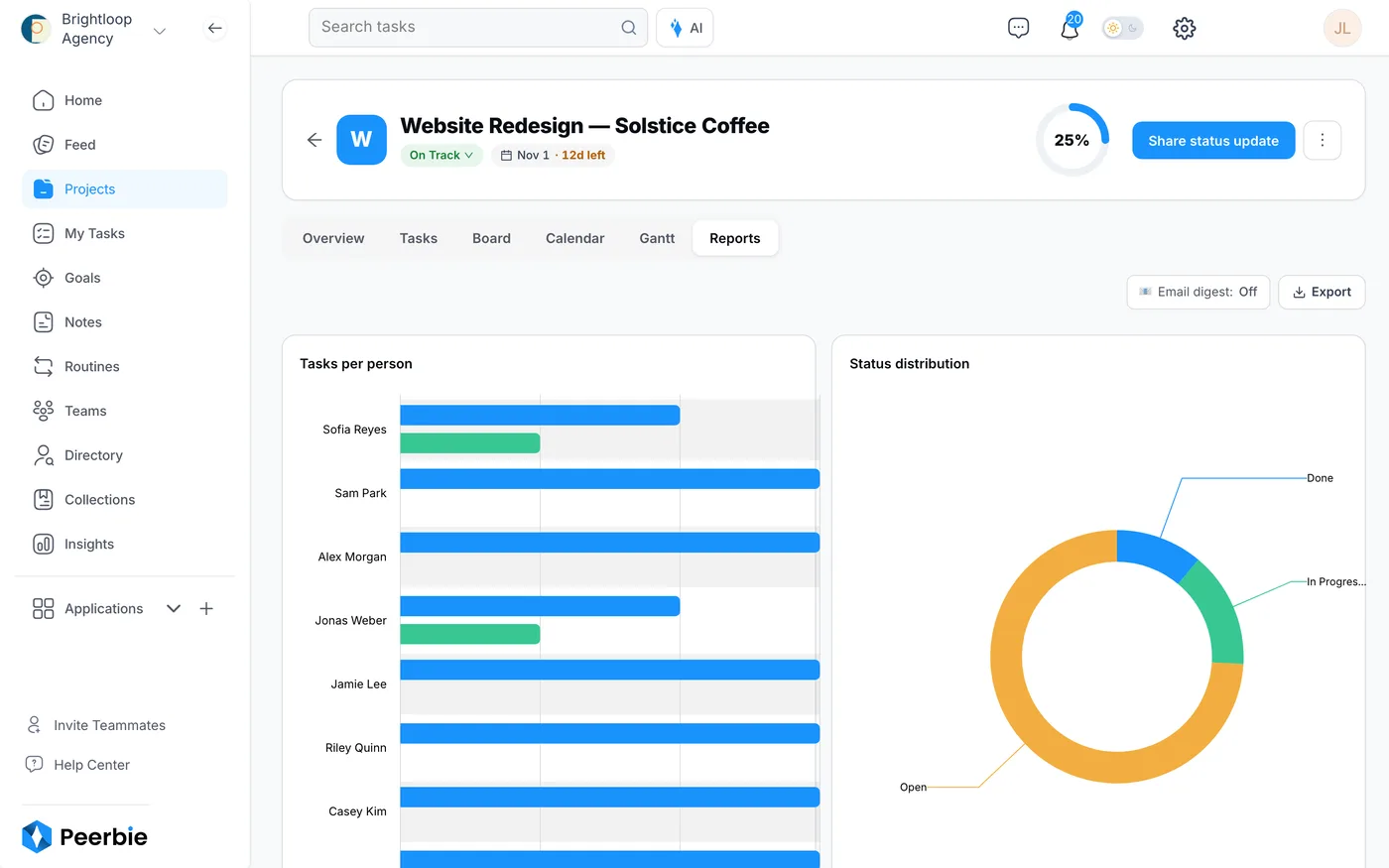
Every project has a board, plus list, calendar and Gantt views, so the dates Trello keeps on cards become a plan you can see. My Tasks shows each person what is overdue, due today and due this week across all projects, and the Reports tab shows open and finished tasks per person. Tasks can recur, have milestones and track time. See Tasks & projects.
The work around the board
- Talk: team chat, direct messages, a company feed with posts, polls and events, and Huddles (audio rooms with screen sharing, on the web) are on every plan, including the free one.
- Goals: company, team and personal goals with key results on every paid plan; link a project to a key result and the work shows up in the goal.
- Workflows: no-code forms and stages for requests and approvals; the free plan includes up to 5.
- Lucy and AI employees (add-on): Lucy builds a project from one sentence, takes notes in your Zoom, Google Meet and Teams calls and turns action items into assigned tasks, and asks before anything is sent or deleted. AI employees propose work each morning and act after you approve. $20 per user a month on Pro and above, with no credits.
Where Trello is the better choice
- Price. Trello Standard costs $5 per user; PeerBie Basic costs $10.
- A bigger free plan. Trello’s free plan holds 10 collaborators; PeerBie’s holds 5 people and 3 projects.
- More connections. Trello’s Power-Ups and integrations go further than PeerBie’s 30+ integrations, and PeerBie does not connect to Trello, so you cannot keep both in sync while you switch.
- Simplicity. If a board is all the team needs, PeerBie is more than you need.
- Huddles are web only, and PeerBie has no desktop app: web, iPhone and Android.
How to switch without losing a week
- Count what you really use. List your boards, the Power-Ups you depend on and your automation rules. That list is your requirements.
- Map lists to stages. Most Trello lists become sections or statuses (To Do, In Progress, Review, Done).
- Move active work only. Recreate open cards; archive the rest in Trello for reference. Ask any vendor whether it imports Trello boards before you plan a manual move.
- Run both for two weeks with one pilot team, then switch the rest.
- Agree two rules on day one: every task has one owner and a due date, and work is discussed on the task, not in a side chat.
Frequently asked questions
What is the best free alternative to Trello?
It depends on team size. ClickUp and Wrike have free plans with no member limit, MeisterTask’s free plan allows unlimited members on 3 projects, and Jira is free for up to 10 users. PeerBie’s free plan covers 5 people and 3 projects and adds team chat, a company feed and Huddles. Asana’s and monday.com’s free plans now cover only two people.
Is Trello still free?
Yes. Trello’s free plan covers up to 10 collaborators and 10 boards per Workspace, with 250 automation runs a month. The calendar and timeline views need Premium, $10 per user a month billed annually.
Which Trello alternative has a Gantt chart?
Asana (Starter and up), monday.com (Standard and up), ClickUp (paid plans), Wrike (Team and up), Microsoft Planner (Plan 1) and PeerBie all offer a timeline or Gantt view. Trello’s own Timeline view is on Premium.
Which Trello alternative has team chat built in?
ClickUp, Basecamp and PeerBie have chat between people inside the tool. Microsoft Planner relies on Teams. Asana has messages but not a full chat app, and Trello itself has card comments only.
Is PeerBie a good Trello alternative?
It is if your team has outgrown a board and wants tasks, chat, meetings and goals in one place, with an AI assistant on Pro. It is not the cheapest: Trello Standard is $5 per user and PeerBie Basic is $10, and for a team that only needs a simple board Trello remains the better buy.
Try your board in PeerBie
Start free with up to 5 people, or try Pro with the Lucy add-on free for 14 days, no credit card needed. Or walk around the live demo workspace without signing up.
Prices and plan limits checked on each vendor’s website on 22 October 2026. If you spot something out of date, tell us at [email protected].
