
AI Agents for Small Business: What to Delegate, What to Approve, What It Costs
A small business has more work than people, and AI agents promise to close the gap: software that does not just answer a question but carries out a job, such as researching a lead, drafting the reply, posting the update or chasing the invoice. Some vendors call them AI employees. The promise is real for some jobs and oversold for others, and the difference usually comes down to one design choice: what the agent may do without asking you.
This guide is for owners and managers of small teams. It covers which jobs to hand to an agent first, which to keep, how approval should work, what the main products cost and how to start without risking a customer relationship. Prices were checked on each vendor’s own website on 22 October 2026. We make one of the products here (AI employees in PeerBie), and we say where others fit better.
What is an AI agent, in plain terms?
An AI agent is software that is given a goal, decides the steps to reach it, and carries them out in your tools, such as your email, CRM or task list, instead of only suggesting what you could do.
It helps to place agents next to the two things small businesses already use:
| Automation (a Zap, a rule) | AI assistant (a chatbot) | AI agent / AI employee | |
|---|---|---|---|
| — | — | — | — |
| How it works | Fixed steps: when X happens, do Y | Answers when you ask | Gets a goal or a role and works out the steps |
| Handles messy input? | No: breaks when the email looks different | Yes, but you copy the result yourself | Yes, and it acts on it |
| Acts in your tools | Yes, exactly as set up | Rarely | Yes, within the permissions you give it |
| Main risk | Silent failure | Wrong answer you notice | A wrong action in your name |
| Best for | Repeatable, predictable steps | Writing, research, questions | Repeatable jobs that need judgement on each case |
In practice the three are combined: a rule notices the new email, an agent reads it and drafts the reply, a person approves it.
How many small businesses use AI today?
It depends on who asks. The U.S. Chamber of Commerce’s 2026 “Empowering Small Business” report (October 2026) found that 66% of small businesses use AI, up from 23% in 2023. The U.S. Census Bureau’s Business Trends and Outlook Survey, which asks whether a firm used AI in any business function in the past two weeks, put use at 19.8% of all firms in May 2026, and below 20% for firms with four or fewer employees. Both point the same way: most small businesses use AI for writing and questions; far fewer have handed it a job to do. That second step is what this guide is about.
Good first jobs for an AI agent
The best first job is frequent, low-risk if done badly, and easy to check. The draft is the agent’s; the decision is yours.
| Job | What the agent does | What you approve |
|---|---|---|
| — | — | — |
| Inbound leads | Researches the company, logs it in the CRM, drafts a first reply | The reply, before it is sent |
| Social media | Drafts posts (with an image) from your calendar of topics | Each post, before it is published |
| Weekly status report | Collects what was done, what slipped and what is next | The report, before it goes to a client or investor |
| Customer emails | Sorts them, answers common questions in draft, flags the angry ones | Every reply to a customer |
| Meeting follow-up | Takes notes, turns action items into tasks, drafts the follow-up email | The email; tasks can go straight in |
| Research | Finds suppliers, competitors or answers on the web, with sources | Nothing, but check the sources |
| Data entry | Moves details from emails and forms into a spreadsheet or CRM | A sample, at first |
Jobs to keep for people
- Anything with money. Paying, refunding, pricing and discounts.
- Decisions about people. Hiring, performance, pay. An agent can prepare the facts.
- Promises to customers. Contract terms, delivery dates and exceptions.
- Anything that cannot be undone. Deleting records, files or emails.
- Sensitive conversations. A complaint, bad news, a negotiation.
How approval should work
OWASP, the open security community, lists “excessive agency” in its Top 10 for large language model applications: an AI system given more functionality, permissions or autonomy than its job needs. Its advice is the same advice you would give a new hire: limit what the agent can touch, and have a person approve high-impact actions. In practice, look for five things:
- Draft, then approve. Anything that leaves the company (an email, a post, a message to a customer) waits as a draft until a person says go.
- Narrow permissions. Connect only the tools the job needs, with the narrowest access the tool offers.
- A record of every action, so you can see what the agent did, when and why.
- A clear owner. Every agent has a person responsible for it, just as every task has an assignee.
- A clear signature. People receiving an email from an agent should be able to tell.
There is a commercial reason to insist on this too. In June 2025 Gartner predicted that over 40% of agentic AI projects will be cancelled by the end of 2027, “due to escalating costs, unclear business value or inadequate risk controls”, and warned of “agent washing”: chatbots and old automation relabelled as agents. A small, approved, measurable first job is the opposite of the projects that get cancelled.
What AI agents cost
Agents are priced in three ways, and the model matters more than the headline price: per seat (a flat price per person), per credit or task (you pay for what the agent does, so a busy month costs more) and per agent (a price for each AI “employee”).
| Product | What it is | Price checked 22 Oct 2026 | Pricing model | Approval, as documented |
|---|---|---|---|---|
| — | — | — | — | — |
| Lindy | Agents across many apps | Team from $29.99 a month for 3,000 credits | Credits, pooled | “Anything with outside impact waits for approval” |
| Zapier | Automations (Zaps) plus Agents | Free: 100 tasks a month; Professional from $19.99 a month billed annually ($29.99 monthly) | Tasks and agent activities | An approval step can pause a Zap; for Agents you ask for confirmation in the instructions |
| n8n | Workflow and agent builder, can be self-hosted | Starter €20 a month billed annually; Community Edition free to self-host | Executions | Approve or deny before a gated tool runs, on paid plans |
| Microsoft 365 Copilot Business | Copilot and ready-made agents in Microsoft 365, up to 300 users | $18 per user a month on an annual commitment (promotion; $21 list), $25.20 monthly | Per seat, some features usage-based | Not checked |
| Copilot Studio | Build your own agents on Microsoft’s platform | $200 a month for 25,000 Copilot Credits, or pay as you go | Credits | Approval steps in agent flows |
| ChatGPT Business | ChatGPT with agent mode and workspace agents | $20 per user a month billed annually, $25 monthly | Per seat, with agent limits | Asks for confirmation on high-impact actions |
| Gemini Enterprise | Google’s agent platform, Business edition for 1–500 users | From $21 per seat a month | Per seat | Not checked |
| Sintra | A set of ready-made AI “helpers” | From $15.60 a month on a 12-month plan (introductory price) | Per account, with credits | Not stated on its pricing page |
| Marblism | Seven ready-made AI employees | $24 a month billed annually, $44 monthly | Per account | Not stated on its pricing page |
| PeerBie AI employees | AI teammates inside a work platform, led by Lucy | Pro $15 + Lucy add-on $20 per user a month, billed annually | Per seat, no credits | Drafts wait for “go ahead”; suggestions need Approve |
A rough guide: if you already live in Microsoft 365 or Google Workspace, start with the agents there. If you want to connect many outside apps and build your own agents, a builder such as Zapier or Lindy goes furthest. If you want agents that work inside the place where your team’s tasks, goals and conversations already are, look at a work platform with agents built in.
How to start in 30 days
- Week 1: pick one job. Choose a job from the table above that happens at least weekly. Write down how a good result looks, the way you would brief a new hire.
- Week 1: connect one or two tools. Only the tools that job needs.
- Weeks 2–3: drafts only. Let the agent do the job, but approve every output. Note what you change; turn those notes into instructions.
- Week 4: measure. How many drafts did you send unchanged? How much time did it save? Did anything go wrong?
- Then decide: keep approving, loosen approval for the safest parts (internal tasks, research), or stop. Add the second job only after the first one works.
How AI employees work in PeerBie
PeerBie is a work platform where a team’s tasks, projects, goals, chat and meetings live together. AI employees are named AI teammates with a role, such as a content writer, a research analyst or a social media manager. They sit in the Directory next to the people, take tasks, use the tools you connect for them and propose work toward your goals.
Hire one for a role
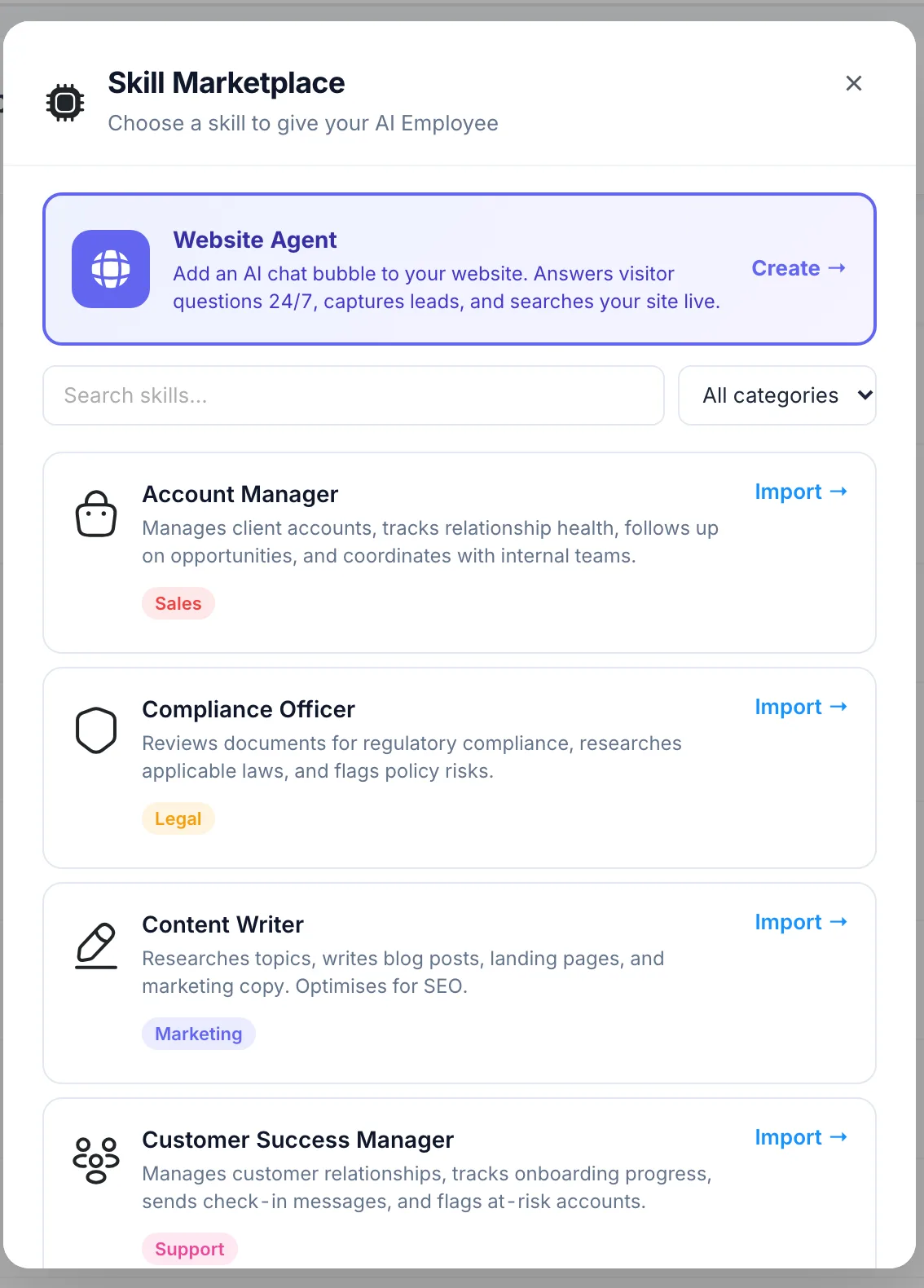
Ask Lucy, PeerBie’s AI chief of staff, “Hire a social media manager called Skyler”, or open Directory → Add AI Employee and pick a role from the Skill Marketplace. Then connect the tools the role needs, such as Gmail, HubSpot, Google Sheets, Slack or LinkedIn. PeerBie has 30+ integrations with real actions. The step-by-step guide is What are AI employees?
They propose; you approve
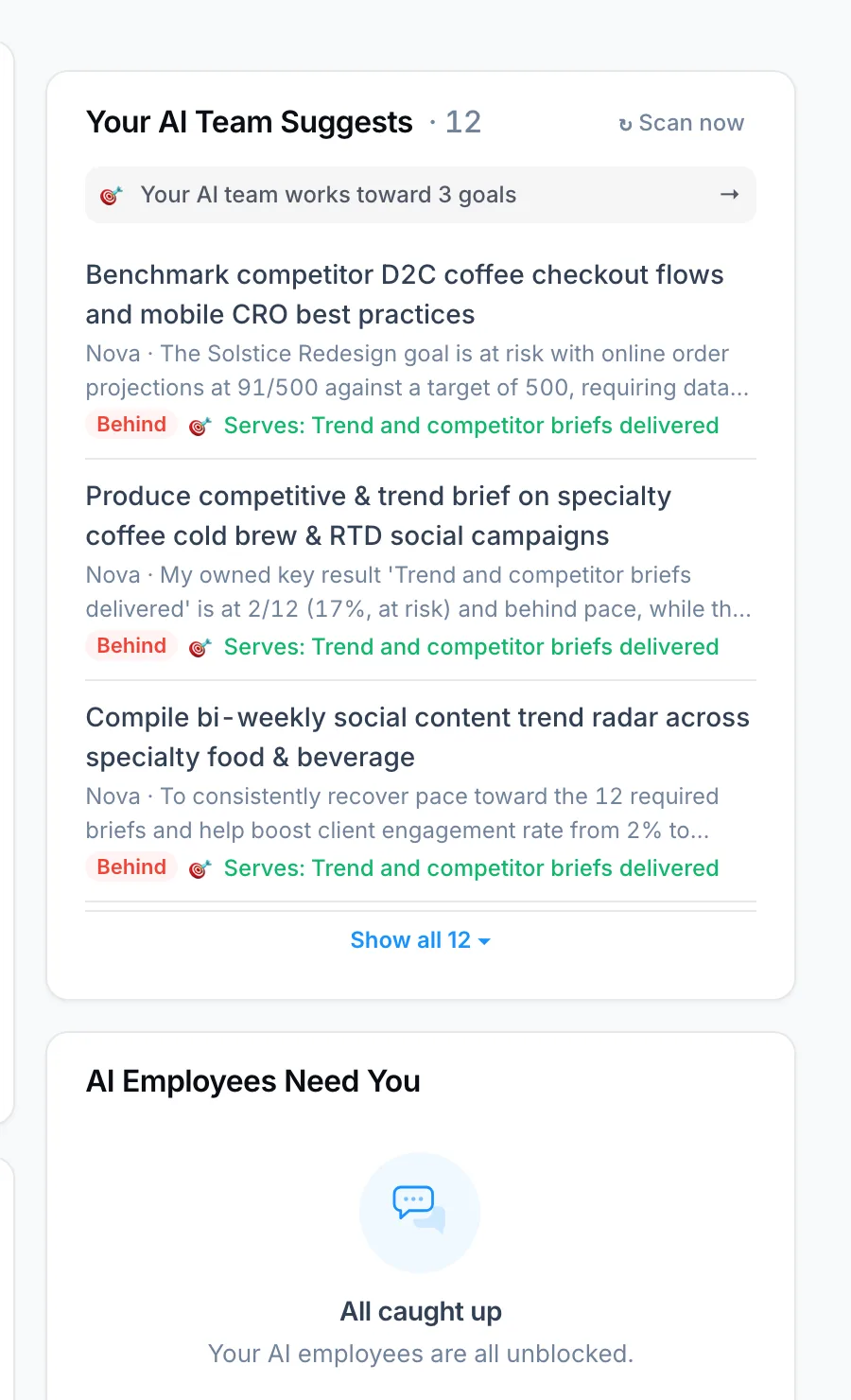
Each morning your AI employees read your goals and open work and suggest what to do next, at most 12 suggestions a day for the whole workspace, so the list stays short. Each suggestion says why, and which goal it serves. Approve creates the task and the AI employee starts; Later or Dismiss keeps it off your plate.
Drafts wait for “go ahead”
You can also assign an AI employee a task like you would a colleague. When the work has to leave PeerBie, such as a social post or an email, it posts the draft on the task and waits. Ask for changes in a comment, and reply “go ahead” when it is right. Every email an AI employee sends names it in a footer, and every AI action is recorded.
More than tasks
- Workflow stages: put an AI employee on a stage of a no-code workflow, with a person approving the next one. See Workflows in PeerBie.
- Key results: give one a key result; it proposes the work that moves the number.
- Calls: AI employees join Huddles (PeerBie’s audio rooms) by voice and can join Zoom, Google Meet or Teams calls.
What it costs
AI employees come with the Lucy AI add-on: $20 per user a month on PeerBie Pro ($15) and above, $35 in total billed annually. There are no credits and no per-agent fees. The 14-day free trial includes it. See Lucy and AI employees.
Where PeerBie is not the best fit
- Fewer connections. AI employees act in 30+ tools; agent builders such as Zapier connect thousands of apps.
- Not a builder for custom code. If you want to design an agent step by step, with your own logic, a builder such as n8n or Zapier gives you more control.
- It is a whole work platform. AI employees work inside PeerBie, with its tasks and goals. If you only want an agent on top of the task tool you already use, PeerBie is the bigger change.
- Pro plus the add-on. There is no AI employee on the free or Basic plans.
Questions to ask any vendor
- What can the agent do without asking, and can I switch each action type off?
- Is there a record of every action?
- Which tools does it connect to, and with which permissions?
- How is it priced, and what happens when credits run out?
- Is my data used to train AI models, and where is it processed?
- Who in my team can give it work, and who approves?
- How does someone receiving its email know it came from an AI?
If you are also looking for an assistant for yourself (inbox, calendar, meetings), our guide to the AI chief of staff covers that side.
Frequently asked questions
What is the difference between an AI agent and an AI employee?
An AI agent is software that works toward a goal by taking steps in your tools. “AI employee” is a name some vendors use for an agent that has a fixed role, a name and a place in the team, such as a social media manager or a research analyst, and takes work the way a colleague would.
Are AI agents safe for a small business?
They can be, if they draft rather than send, use only the tools and permissions their job needs, keep a record of every action and have a person approve anything that leaves the company or cannot be undone. The risk grows with autonomy, so start with drafts and loosen approval only where mistakes are cheap.
How much do AI agents cost for a small business?
It depends on the pricing model. Some charge per seat, some per credit or task, some per agent. A flat price per user is easiest to budget; credits can be cheaper for light use but grow with a busy month. Check what happens when credits run out before you commit.
Which job should I give an AI agent first?
A job that happens at least weekly, is easy to check and does little harm if the first draft is wrong: researching inbound leads, drafting social posts, writing the weekly status report or turning meeting action items into tasks. Keep money, people decisions and customer promises with a person.
Do PeerBie’s AI employees act without approval?
No. They propose work each morning and draft what has to leave PeerBie, such as an email or a social post, and a person approves before anything is sent, published or created from a suggestion. They come with the Lucy AI add-on, $20 per user a month on Pro and above, with no credits.
Meet your AI team
Try PeerBie Pro with the Lucy add-on free for 14 days, no credit card needed, and hire your first AI employee in a sentence. Or walk around the live demo workspace, where the AI employee Nova already works, without signing up.
Prices and features checked on each vendor’s website on 22 October 2026. If you spot something out of date, tell us at [email protected].
