
Asana Alternatives: 8 Tools Compared on Price, AI and Fit
Asana is one of the best work managers ever built. People still leave it, usually for one of four reasons: the price jump to the Advanced plan, seats sold in blocks, conversations that live in a separate chat app, and AI that is metered per request. This guide compares eight alternatives on exactly those points, with prices checked on each vendor’s own pricing page on 20 October 2026.
A note on fairness: we make PeerBie, which is one of the eight. We say where the others are stronger, including where they beat us.
The short answer: which Asana alternative fits which team
- Cheapest per seat with a big free plan: ClickUp. It does almost everything, but it takes time to learn.
- Flexible boards and dashboards: monday.com, if you are at least 3 people (paid plans start at 3 seats).
- Heavy planning, Gantt charts and resource management: Wrike or Smartsheet.
- Docs and wiki first, projects second: Notion.
- One flat monthly price, no per-user fees: Basecamp.
- Simple kanban for a small team: Trello.
- Tasks, chat, meetings and goals in one app, with an AI assistant that turns meetings into tasks: PeerBie.
Why teams look for an Asana alternative
Asana does many things well: polished list, board, timeline and Gantt views, rules and forms, a large integration marketplace, and portfolios on higher plans. If your team is happy, stay. These are the points that most often push teams to look around.
1. Goals and workload sit on the expensive plan
Goals, portfolios and workload planning are on Advanced, which costs $24.99 per user a month billed annually ($30.49 monthly). Starter is $10.99 ($13.49 monthly). Teams that want to connect work to goals more than double their bill.
2. Seats are sold in blocks
Asana’s pricing page explains that between 2 and 5 users you add seats one at a time, up to 30 users in blocks of 5, up to 100 in blocks of 10, and so on. A team of 12 pays for 15 seats; a team of 31 pays for 40. There is no one-seat paid plan, and the free Personal plan is for one or two people.
3. Conversations happen elsewhere
Asana has task comments, direct messages and team conversations. Most teams still keep Slack or Microsoft Teams for real-time chat, and a separate tool for meeting notes, so decisions get split across three places.
4. AI is metered
Asana now includes AI Teammates and Asana Dash, which it calls an AI chief of staff. Each paid plan includes 5 AI requests per user a month with an account-wide cap; extra requests are bought in packs ($0.50 each) or on demand ($0.60 each). That is fine for occasional use, but hard to budget if your team leans on AI daily.
Asana alternatives compared at a glance
| Tool | Best for | Free plan | Paid from (per user / month, annual) | Goals / OKRs | Team chat | Meeting notes become tasks | How AI is priced |
|---|---|---|---|---|---|---|---|
| Asana (baseline) | Polished project management | 1–2 people | $10.99; Advanced $24.99 | Advanced and up | Messages; most add Slack/Teams | Through integrations | 5 requests/user/month, then $0.50–0.60 each |
| ClickUp | Everything in one, lowest price | Unlimited members, 60 MB | $7–9 (two line-ups shown) | Yes, from the first paid plan | Yes | AI Notetaker, unlimited with Everything AI | Pooled credits; Brain AI $9 or Everything AI $28 on top |
| monday.com | Flexible boards and dashboards | 2 seats | $9 (3-seat minimum) | Not checked | Updates on items, no chat | AI notetaker from Standard ($12) | 1,000–3,000 AI credits/month by plan |
| Wrike | Planning and resource management | Yes, basic | $10 (Team, 2–15 users) | Not checked | Not checked | Not checked | Included by plan; larger AI packs on higher tiers |
| Smartsheet | Spreadsheet-style project tracking | No (30-day trial) | $9 Pro; $19 Business (3+ members) | Not checked | No | Not checked | AI features included on paid plans |
| Notion | Docs, wiki and light projects | Yes, with an AI trial | $10 Plus; $20 Business (less yearly) | Templates only | No (page comments) | AI Meeting Notes on Business | Full AI on Business; agents use credits |
| Basecamp | Calm projects at a flat price | 1 project, 3 users | $29–199 a month for the whole account | No | Yes (Campfire) | No | No built-in AI; ChatGPT and Claude connectors |
| Trello | Simple kanban | 10 collaborators | $5; Premium $10 | No | No | No | AI features by plan |
| PeerBie | Tasks, chat, meetings and goals in one place | Up to 5 people, 3 projects | $10 Basic; $15 Pro | Every paid plan | Yes, plus feed and audio rooms | Yes, with the Lucy add-on | One add-on: $20/user/month on Pro, no credits |
The eight alternatives, one by one
ClickUp: the most features for the money
ClickUp covers tasks, docs, whiteboards, chat, goals, time tracking and dashboards in one app, and its Free Forever plan allows unlimited members. Paid plans start around $7–9 per user a month billed annually; on 20 October 2026 its pricing page showed two plan line-ups side by side (Unlimited and Business, and Core, Business and Max), so check which one you are offered.
Watch out for: the learning curve, and AI that comes in layers: pooled credits in every plan, plus Brain AI ($9 per user) or Everything AI ($28 per user) on top.
monday.com: the most flexible boards
monday.com is excellent when your work is a pipeline of items with statuses, owners and numbers, and its dashboards are among the best. Basic is $9, Standard $12 and Pro $19 per seat a month billed annually, with a 3-seat minimum on paid plans, and each plan includes a monthly pool of 1,000 to 3,000 AI credits.
Watch out for: there is no team chat, so most teams keep Slack or Teams, and the free plan is limited to 2 seats.
Wrike: built for planning-heavy teams
Wrike suits PMO-style teams that need Gantt charts, resource planning and reporting across many projects, and it has desktop apps for Windows and Mac. There is a free plan; Team is $10 per user a month for 2 to 15 users, and Business is $25 for 5 to 200 users.
Watch out for: it is more than a small team needs, and plans are tied to team-size bands.
Smartsheet: for teams that think in spreadsheets
If your projects already live in Excel, Smartsheet will feel familiar: grids with formulas, plus Gantt, board and calendar views. Pro is $9 per member a month billed yearly ($12 monthly) for up to 10 members; Business is $19 ($24 monthly) with a 3-member minimum. There is no free plan, only a 30-day trial.
Watch out for: it is a tracking tool more than a place to talk, so conversations stay elsewhere.
Notion: docs and wiki first
Notion is the best place to write things down: docs, wikis and flexible databases with subtasks and dependencies. Plus is $10 and Business $20 per member a month (less with yearly billing). Full Notion AI, including AI Meeting Notes, starts on Business; custom agents are billed in credits.
Watch out for: you build your project system yourself, and there is no team chat or native goals feature.
Basecamp: one flat price
Basecamp is calm and simple: to-dos, message boards, schedules and Campfire chat. It charges per account, not per person: Freelancer $29 a month (3 projects, 5 users), Pro $79, Pro Plus $99, and Pro Unlimited $199 a month billed annually ($329 monthly) for unlimited users. For a large team with simple needs, nothing is cheaper.
Watch out for: no goals, no workflow builder and no built-in AI (it offers ChatGPT and Claude connectors instead).
Trello: the simplest board
Trello is still the easiest way to move cards across a board. It is free for up to 10 collaborators per workspace; Standard is $5 and Premium $10 per user a month billed annually.
Watch out for: once you need goals, reporting or chat, you are adding other tools.
Software teams: if you build software, also look at Linear (free plan; Basic $10 and Business $16 per user a month billed yearly) and Jira (free for up to 10 users; Atlassian raised list prices on 13 October 2026, so check its pricing page).
How PeerBie handles what Asana leaves out
PeerBie is a work platform that puts tasks, goals, chat, a company feed and meetings in one app, with an AI assistant, Lucy, available as an add-on. Here is what that means in practice, and where it falls short.
Projects and tasks
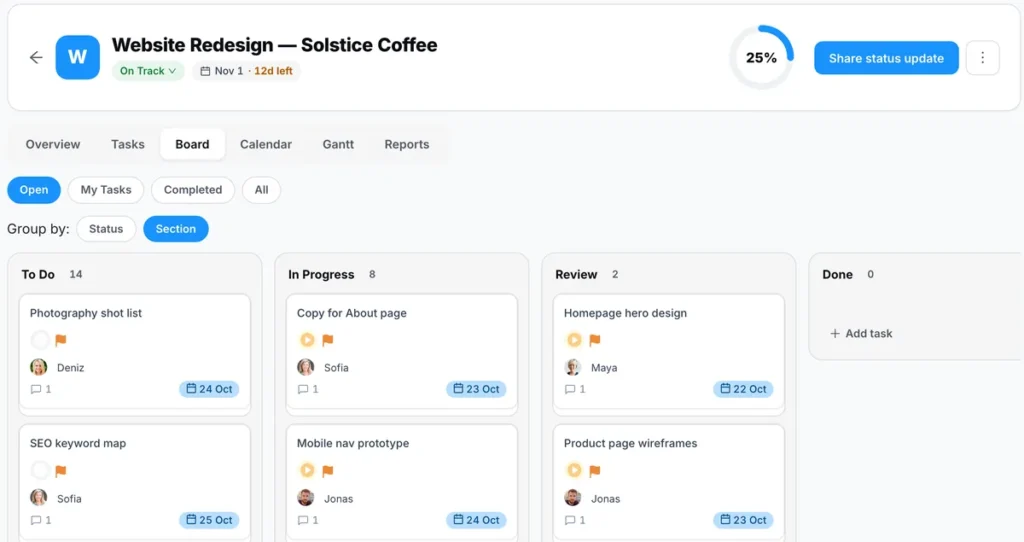
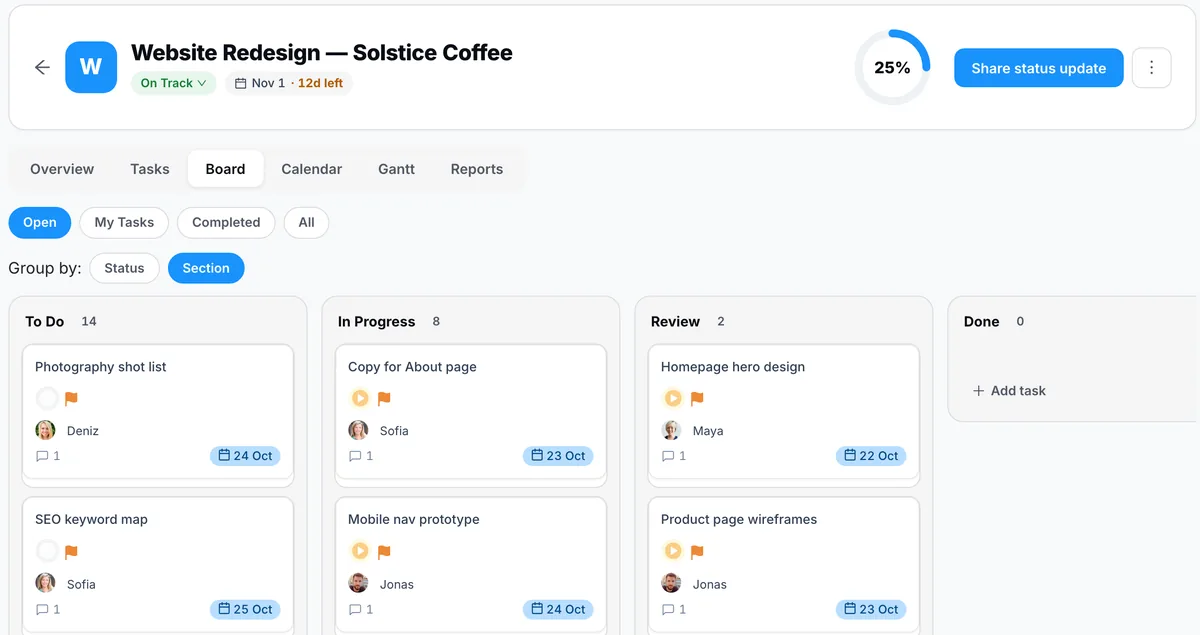
Projects come in list, board, calendar and Gantt views, with a Reports tab per project, with recurring tasks, milestones, start/pause time tracking, timesheets and project dashboards. Project financials work out cost from tracked time × hourly rate and warn you at 80% and 100% of budget. See projects and tasks.
Goals on every paid plan, not just the top one
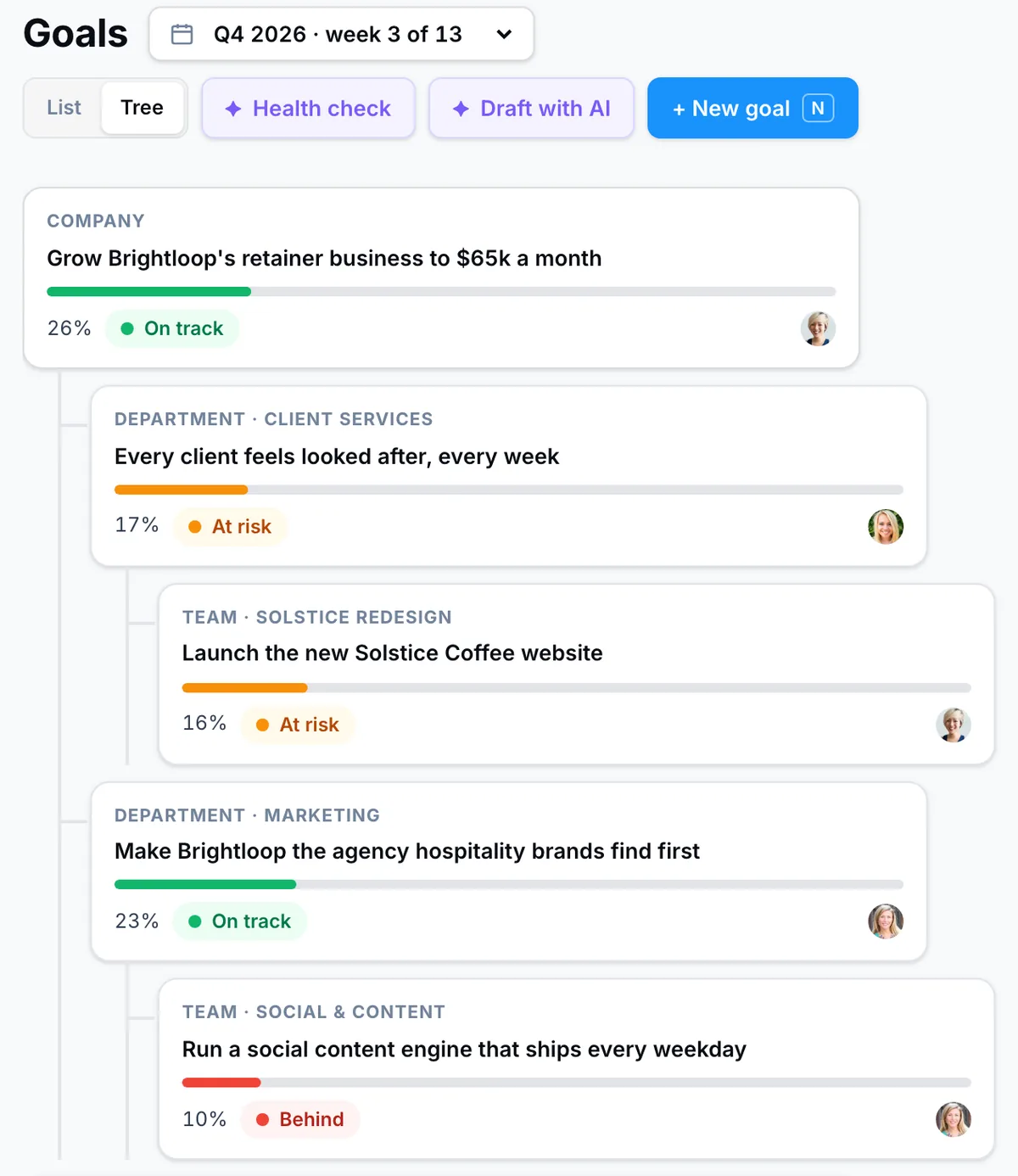
Goals and OKRs run from company to department, team and person, with key results that can update from HubSpot, Stripe, Salesforce, Google Sheets or Excel, Jira, Pipedrive and Linear. Basic includes 20 AI goal drafts a month; Pro adds unlimited drafts, break-downs and a goal health check. See Goals & OKRs.
Conversations next to the work
Team chat, direct messages, a company feed with posts, polls and events, and Huddles (drop-in audio rooms with screen share on the web) are included on every plan, including the free one.
Meetings that end in assigned tasks
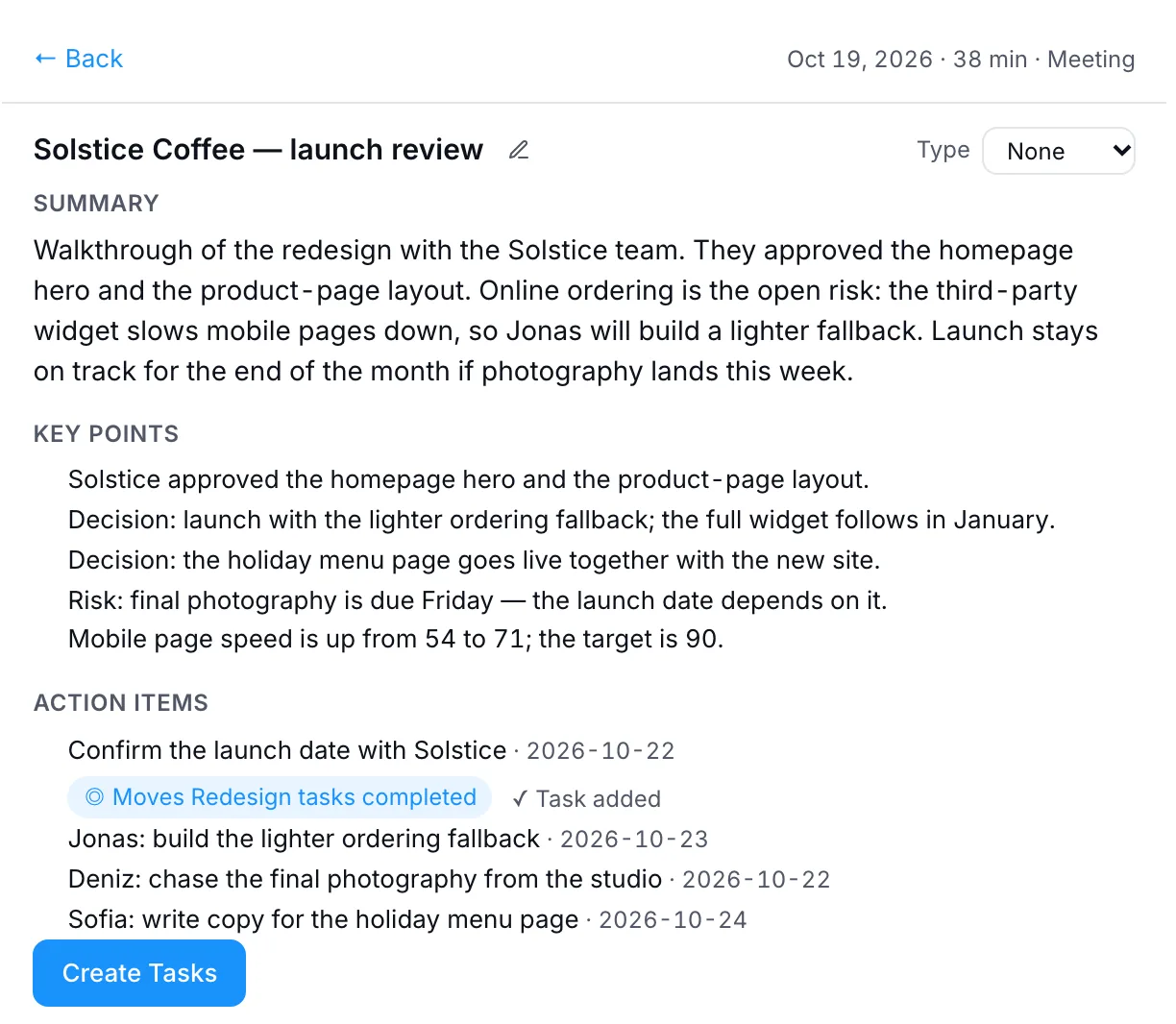
You can create Zoom, Google Meet or Microsoft Teams meetings from PeerBie. With the Lucy add-on, a silent note-taker joins the calendar meetings you choose and files the summary, decisions and action items; you check them and they become tasks with owners and due dates. See Meetings & notes.
AI priced per person, not per request
Lucy and AI employees come as one add-on: $20 per user a month, available on Pro and Enterprise, with no credits. Lucy works with your tasks, Gmail or Outlook, calendar and meeting notes, and asks before she sends an email or deletes anything. AI employees propose work each morning and act after you approve. See pricing.
Where PeerBie is weaker than Asana (and others)
- No timeline or Gantt view. Asana (from Starter), ClickUp, Wrike and Smartsheet have one. If your plans depend on Gantt charts, that matters.
- A smaller integration list: 30+ integrations with real actions, against marketplaces with hundreds of apps.
- No desktop app: PeerBie runs on the web, iPhone and Android. Huddles are web only.
- Full AI costs more than Asana Starter. Pro plus Lucy is $35 per user a month billed annually. If you only need occasional AI help, Asana’s included requests may be enough.
- A younger product with a smaller community, fewer templates and fewer consultants who know it.
For the full head-to-head, read Asana vs PeerBie, or see all our comparisons.
What a 12-person team would pay
List prices billed annually, as of 20 October 2026. Asana counts 15 seats because of its seat blocks.
| Option | Seats billed | Per year |
|---|---|---|
| Asana Starter | 15 | $1,978 |
| Asana Advanced (adds goals and workload) | 15 | $4,498 |
| PeerBie Basic (includes goals) | 12 | $1,440 |
| PeerBie Pro | 12 | $2,160 |
| PeerBie Pro + Lucy AI add-on | 12 | $5,040 |
The honest reading: without AI, PeerBie costs less than Asana for most team sizes and includes goals and chat. With the Lucy add-on, PeerBie costs more than Asana Advanced, and what you pay for is the note-taker, the AI employees and an assistant without request caps.
How to choose: five questions
- Do you need Gantt charts and dependencies? Then shortlist Wrike, Smartsheet, ClickUp or stay on Asana.
- Where do conversations happen today? If you want to retire a separate chat app, look at ClickUp, Basecamp or PeerBie.
- Do meetings create most of your work? Check whether action items become assigned tasks without copying and pasting.
- How much AI will you really use? Occasional use fits included credits; daily use is easier to budget with a flat per-user price.
- How many seats will you pay for? Check minimums (monday.com 3, Smartsheet Business 3) and seat blocks (Asana).
Switching from Asana without losing work
- Start with one team and one live project, not the whole company.
- Keep Asana read-only for a month so nobody loses history.
- Recreate your recurring tasks and templates first: they carry most of the routine.
- Move goals last, once real work is flowing in the new tool.
- Run your next three meetings in the new tool and check that the action items end up as owned tasks.
Frequently asked questions
What is the best Asana alternative?
It depends on why you are leaving. For a lower price with a strong free plan, ClickUp. For flexible boards and dashboards, monday.com. For heavy planning and resource management, Wrike or Smartsheet. For docs and wiki first, Notion. For one flat price, Basecamp. For tasks, chat, meetings and goals in one app with an AI assistant, PeerBie.
Is there a free alternative to Asana?
Yes. ClickUp Free Forever allows unlimited members with 60 MB of storage. Trello is free for up to 10 collaborators per workspace. Wrike has a free plan for basic task management. PeerBie Starter is free for up to 5 people with 3 projects and 1,500 tasks. Asana’s own free Personal plan is for one or two people.
Why is Asana so expensive for small teams?
Two reasons: goals, portfolios and workload planning sit on the Advanced plan ($24.99 per user a month billed annually), and paid seats are sold in steps. Between 6 and 30 users you add seats in blocks of 5, so a team of 12 pays for 15 seats.
Which Asana alternative has AI built in?
Almost all of them now, but it is priced differently. monday.com includes AI credits on each paid plan, ClickUp sells Brain AI ($9 per user) and Everything AI ($28 per user) on top, Notion puts full AI on its Business plan, and Asana includes 5 AI requests per user a month. PeerBie sells its AI, Lucy, as one $20 per user add-on on Pro, with no credits.
Can I keep Asana and use PeerBie alongside it?
Yes. Asana is one of PeerBie’s 30+ integrations: an AI employee you connect to Asana can list and create Asana tasks, which helps if one team switches first and another stays on Asana for a while.
Try it with your own work
PeerBie has a free plan for up to 5 people and a 14-day Pro trial, no credit card needed. Or walk around the live demo workspace without signing up.
Prices and features checked on each vendor’s website on 20 October 2026. Vendors change plans often; if you spot something out of date, tell us at [email protected].
