
40 OKR Examples by Department, with Real Numbers to Copy
Most lists of OKR examples have the same problem: the key results say “increase leads by X%” or “launch the new website”. The first has no number to aim for, and the second is a task, not a result. Copy them and your OKRs turn into a to-do list nobody checks.
The 40 examples below are written the way a key result should be: a start value, a target and a unit, so you can tell at week 9 of 13 whether you are on pace. Next to each one we say where the number usually comes from, because a key result nobody can measure without a spreadsheet hunt is the first to go stale.
The numbers are illustrative, not benchmarks. Replace each start value with your own baseline, and set the target from there.
A 60-second refresher: what makes a good OKR
An objective is where you want to be at the end of the quarter, in plain words. Key results are the two to four numbers that prove you got there. Three rules catch most bad OKRs:
- Every key result has a start, a target and a unit. “Net revenue retention 98% → 105%”, not “improve retention”.
- Key results measure outcomes, not activity. If you could finish it by doing a task, it is a task. Put it in the project plan and measure what the task should change.
- Fewer is better. Two to four objectives per team, each with two to four key results. More than that and nobody remembers them by week three.
Here is how to turn the most common “tasks dressed as results” into real key results:
| Written as a task | Rewritten as a key result |
|---|---|
| Launch the new website | Website visitors who start a trial: 1.5% → 3% |
| Run a leadership course for managers | Manager effectiveness score: 3.6 → 4.2 out of 5 |
| Hire a customer success manager | 90-day customer churn: 8% → 4% |
| Migrate to the new help desk | Median first response time: 6 hours → 1 hour |
| Write 12 blog posts | Organic sign-ups: 120 → 200 a month |
The task still matters. It becomes the work that moves the key result, tracked in a project, rather than the key result itself.
40 OKR examples by department
Four examples for each of ten areas: company, sales, marketing, customer success and support, product, engineering, HR and people, operations, finance and personal. Each objective has three key results; most teams would pick two or three objectives and keep the key results that fit.
Company OKR examples
Company OKRs set direction for everyone. Keep them to two to four, and make sure every department can point to one it moves.
| Objective | Key results (start → target) | Where the number comes from |
|---|---|---|
| 1. Grow recurring revenue | New annual recurring revenue: $1.2M → $1.6M Net revenue retention: 98% → 105% Share of revenue on annual plans: 40% → 55% | Billing system (for example Stripe) or the finance spreadsheet |
| 2. Become the easiest product in our category to start with | Trial-to-paid conversion: 9% → 13% Median days from sign-up to first value: 6 → 2 Onboarding satisfaction: 4.1 → 4.5 out of 5 | Billing system, product analytics, short in-app survey |
| 3. Build a team people want to stay in | Regretted attrition (annualised): 14% → 9% Employee NPS: 12 → 25 Offer acceptance rate: 70% → 85% | HR system, engagement survey, recruiting spreadsheet |
| 4. Run a business that funds its own growth | Gross margin: 62% → 68% Months of runway: 14 → 18 Operating cash flow: −$40k → break-even per month | Accounting system, finance spreadsheet |
Sales OKR examples
Sales key results should mix a lagging number (revenue, win rate) with a leading one the team controls this week (deals with a dated next step).
| Objective | Key results (start → target) | Where the number comes from |
|---|---|---|
| 5. Build a pipeline we can forecast from | Qualified pipeline created: $800k → $1.2M Win rate on qualified deals: 18% → 24% Open deals with a dated next step: 55% → 90% | CRM (for example HubSpot or Salesforce) |
| 6. Shorten the sales cycle | Median days from first meeting to close: 64 → 45 Proposals sent within 48 hours of discovery: 40% → 80% Deals lost to “no decision”: 30% → 15% | CRM |
| 7. Grow the accounts we already have | Expansion revenue: $90k → $150k Accounts using two or more products: 12 → 25 Quarterly business reviews held with top-20 accounts: 6 → 20 | CRM and billing system |
| 8. Turn partners into a real revenue channel | Partner-sourced revenue: $0 → $60k Active resellers: 4 → 15 Resellers who closed their first deal: 0 → 10 | CRM, or a partner workflow that counts who reaches “Signed” |
Marketing OKR examples
Marketing OKRs work best when at least one key result is counted in the CRM, not only in marketing’s own tools, so sales and marketing agree on what a good lead is.
| Objective | Key results (start → target) | Where the number comes from |
|---|---|---|
| 9. Bring in leads sales wants to call | Marketing-qualified to sales-qualified rate: 22% → 35% Sales-qualified leads from inbound: 60 → 100 a month Cost per sales-qualified lead: $410 → $300 | CRM and ad platforms |
| 10. Get found by people with the problem we solve | Organic sign-ups: 120 → 200 a month Non-brand search clicks: 3,000 → 5,000 a month Target pages ranking in the top 10: 8 → 20 | Web analytics and Search Console, exported to a spreadsheet |
| 11. Launch the new plan so customers notice | Accounts activated on the new plan in 30 days: 0 → 300 Existing customers using the new feature: 0% → 25% Pipeline attributed to the launch: $0 → $150k | Product analytics, billing system, CRM |
| 12. Let customers do our marketing | Published customer stories: 2 → 6 Reviews on the main review site: 15 → 40 Referral sign-ups: 10 → 40 a quarter | Spreadsheet, review site, CRM |
Customer success and support OKR examples
Support and success teams own the numbers that decide whether revenue stays: churn, retention and how quickly customers get help.
| Objective | Key results (start → target) | Where the number comes from |
|---|---|---|
| 13. Every new customer succeeds in their first 90 days | Accounts reaching the onboarding milestone within 30 days: 45% → 70% 90-day customer churn: 8% → 4% Accounts with a named internal champion: 50% → 85% | CRM or customer-success tool, billing system |
| 14. Support that is fast and actually helps | Median first response time: 6 hours → 1 hour Customer satisfaction (CSAT): 86% → 92% Tickets reopened after closing: 12% → 6% | Help-desk tool, exported to a spreadsheet |
| 15. Fewer tickets, because fewer things break or confuse | Tickets per 100 active accounts: 30 → 20 Questions solved by the help centre without a ticket: 25% → 40% Top-5 ticket reasons with a fix shipped: 1 → 4 | Help-desk tool, issue tracker (for example Jira) |
| 16. Renew and grow on time | Gross revenue retention: 88% → 93% Renewals closed before the due date: 60% → 85% Accounts flagged at risk with a recovery plan: 40% → 100% | CRM and billing system |
Product OKR examples
Product OKRs should measure what customers do after something ships, not that it shipped. “Launch feature X” is a task; “25% of accounts use X weekly” is a result.
| Objective | Key results (start → target) | Where the number comes from |
|---|---|---|
| 17. Make the core workflow effortless | Task success in usability tests: 60% → 85% Weekly active users per account: 5.1 → 6.5 Support tickets about the workflow: 80 → 30 a month | Usability tests, product analytics, help-desk tool |
| 18. Ship what customers actually use | New features used by 20%+ of accounts after 30 days: 30% → 50% Roadmap items validated with 5+ customers before build: 20% → 80% Features removed or merged that nobody used: 0 → 3 | Product analytics, research log |
| 19. A mobile app people rate highly | Accounts active on mobile each week: 18% → 30% Store rating: 4.1 → 4.5 Crash-free sessions: 98.5% → 99.5% | App store consoles, crash reporting |
| 20. Learn from customers every week | Customer interviews: 4 → 12 a month Product decisions with linked customer evidence: 25% → 75% Time from feedback to reply: 10 days → 3 days | Research log, issue tracker |
Engineering OKR examples
Engineering key results borrow well from the four DORA delivery metrics (change failure rate, deployment frequency, lead time and time to restore), because they are counted automatically.
| Objective | Key results (start → target) | Where the number comes from |
|---|---|---|
| 21. Release with confidence | Change failure rate: 18% → 8% Deploys to production: 3 → 10 a week Median lead time for changes: 5 days → 1 day | CI/CD pipeline, issue tracker (for example Jira) |
| 22. Keep the product up | Monthly uptime: 99.5% → 99.9% Median time to restore service: 3 hours → 45 minutes Priority-1 incidents: 6 → 2 a quarter | Monitoring tool, incident log |
| 23. Make the product feel fast | 95th-percentile page load: 3.2 s → 1.5 s Slowest 10 API endpoints under 300 ms: 2 → 10 Users rating speed “good” in the survey: 55% → 75% | Performance monitoring, in-app survey |
| 24. Pay down what slows us down | Time spent on unplanned work: 35% → 20% Critical bugs open longer than 30 days: 40 → 5 Build time: 25 → 10 minutes | Issue tracker, CI pipeline |
HR and people OKR examples
People teams often write OKRs as programmes (“run a leadership course”). Measure what the programme should change instead.
| Objective | Key results (start → target) | Where the number comes from |
|---|---|---|
| 25. Hire the team in the plan | Planned roles filled: 6 of 10 → 10 of 10 Median days to hire: 52 → 35 Offer acceptance rate: 70% → 85% | Recruiting tool, or a hiring workflow that counts who reaches “Hired” |
| 26. Every new hire has a great first month | New hires finishing their onboarding plan in 30 days: 50% → 90% 30-day new-hire survey: 3.8 → 4.5 out of 5 New hires with their first task done in week one: 40% → 95% | Onboarding checklist, short survey |
| 27. Grow people inside the company | Employees with a written development plan: 30% → 90% Roles filled by internal moves: 10% → 30% Learning budget used: 35% → 80% | HR system, finance spreadsheet |
| 28. Managers who lead well | Manager effectiveness score: 3.6 → 4.2 out of 5 Managers holding a monthly 1:1 with every report: 55% → 95% Teams with written team goals: 40% → 100% | Engagement survey, check-ins |
Operations OKR examples
Operations OKRs are about speed, cost and reliability of the processes everyone else depends on.
| Objective | Key results (start → target) | Where the number comes from |
|---|---|---|
| 29. Deliver on time, every time | On-time delivery: 88% → 97% Median days from order to shipment: 3.5 → 2 Orders needing a manual fix: 7% → 2% | Order system, exported to a spreadsheet |
| 30. Lower the cost to serve | Cost per order: $7.40 → $6.00 Manual steps in the order process: 14 → 6 Orders handled per person per day: 40 → 55 | Finance spreadsheet, process map |
| 31. Approvals that don’t wait | Median purchase-approval time: 4 days → 1 day Requests submitted through one form: 30% → 100% Requests approved without a chaser: 50% → 90% | An approval workflow, which counts requests by stage |
| 32. No surprises from suppliers | Critical items with a backup supplier: 40% → 80% Stock-outs: 9 → 2 a quarter Suppliers reviewed on the scorecard: 5 → 20 | Inventory system, supplier spreadsheet |
Finance OKR examples
Finance OKRs make the company faster to decide: books closed sooner, cash in sooner, forecasts that hold.
| Objective | Key results (start → target) | Where the number comes from |
|---|---|---|
| 33. Close the books faster | Month-end close: 10 → 5 working days Manual journal entries: 120 → 50 a month Reconciliations done by day 3: 30% → 90% | Accounting system |
| 34. Get paid on time | Days sales outstanding: 58 → 40 Invoices more than 30 days overdue: $140k → $50k Customers paying by automatic payment: 35% → 60% | Accounting or billing system |
| 35. Spend where it counts | Budget variance per department: ±15% → ±5% Software spend per employee: $210 → $170 a month Unused software licences cancelled: 0 → 40 | Finance spreadsheet, licence list |
| 36. A forecast leadership trusts | Revenue forecast accuracy: ±12% → ±5% Months the rolling forecast was refreshed on time: 1 of 3 → 3 of 3 Department heads signing off their forecast: 3 of 8 → 8 of 8 | Finance spreadsheet, check-ins |
Personal OKR examples
Personal OKRs can support a team goal or be entirely your own. They work the same way: a direction, and two or three numbers that prove you got there.
| Objective | Key results (start → target) | Where the number comes from |
|---|---|---|
| 37. Become a confident presenter | Talks given to an outside audience: 0 → 2 Average audience feedback: 3.9 → 4.5 out of 5 Rehearsals recorded and reviewed: 0 → 6 | Check-ins |
| 38. Protect time for deep work | Meeting-free focus hours: 6 → 12 a week Meetings accepted without an agenda: 50% → 10% Weeks ending with the top priority done: 5 of 13 → 11 of 13 | Calendar, check-ins |
| 39. Get fluent with our data | Course modules completed: 0 → 12 Dashboards built that the team uses weekly: 0 → 2 Questions answered without asking an analyst: 0 → 10 | Check-ins, linked project |
| 40. Run a half marathon this spring | Longest run: 8 km → 21 km Runs a week: 1 → 3 Weeks on the training plan: 0 of 12 → 12 of 12 | Check-ins (or simply tell Lucy “ran 14 km this morning”) |
How the levels connect: one goal from company to person
OKRs work when each level can see which key result above it they are moving. Here is one line through four levels:
| Level | Objective | Key result it supports, or owns |
|---|---|---|
| Company | Grow recurring revenue | Owns: new annual recurring revenue $1.2M → $1.6M |
| Department (Sales) | Turn partners into a real revenue channel | Supports the company key result. Owns: partner-sourced revenue $0 → $60k |
| Team (Partnerships) | Sign and onboard new resellers | Supports partner-sourced revenue. Owns: active resellers 4 → 15 |
| Personal | Become the go-to trainer for resellers | Supports active resellers. Owns: resellers who closed their first deal after training 0 → 10 |
Notice that not every team needs a goal under every company goal. A team should support the one or two company key results it can actually move, and leave the rest alone.
Five mistakes that make OKRs fail by week three
- Too many. Ten objectives is a strategy document, not a quarter’s focus.
- Numbers nobody can find. If updating a key result means asking someone for an export, it will not be updated. Choose numbers that already live in a tool, or that the owner can report in ten seconds.
- Progress without pace. “40% done” means nothing without “week 9 of 13”. Look at pace every week.
- Everything committed. Decide which OKRs must be hit (committed) and which are a stretch (aspirational). Missing a stretch target at 70% can be a good quarter.
- No ending. At the end of the quarter, close each goal, carry it over or extend it, and write down what you learned before setting the next ones.
If you are unsure whether a number belongs in an OKR or on a dashboard, read the difference between KPIs and OKRs. Many of the key results above, such as uptime or days sales outstanding, are KPIs you only put in an OKR for the quarter you want to change them.
Putting these OKRs into PeerBie
A spreadsheet is fine for your first quarter. When updating the numbers by hand becomes the chore that kills the OKRs, a tool that keeps them current helps. This is how it works in PeerBie, which we make; our guide to OKR software compares it fairly with eight other tools.
- Start from one sentence. Paste an objective from this page or describe what you want. Lucy, PeerBie’s AI assistant, drafts the goal and measurable key results, and flags any key result that is really a task.
- Four levels. Company, department, team and personal goals, and each can support a key result one level up. Personal goals are private unless you share them.
- Four ways to measure. The owner checks in with the number and a confidence level; a linked project moves the key result as its tasks get done; a workflow counts what reaches a stage (every candidate who reaches Hired, for example); or, on Pro, a connected tool supplies the number. Connected sources include HubSpot, Stripe, Salesforce, Google Sheets or Excel, and Jira (see integrations). Anything else can come in through a spreadsheet or a check-in.
- Pace, not just progress. PeerBie warns you when a key result is behind pace, for example “35% at week 9 of 13”, and weekly key-result check-ins can arrive in Slack.
- An honest end to the quarter. For each unfinished goal you close it, carry it over or extend it, and Lucy writes a summary of what the period achieved.
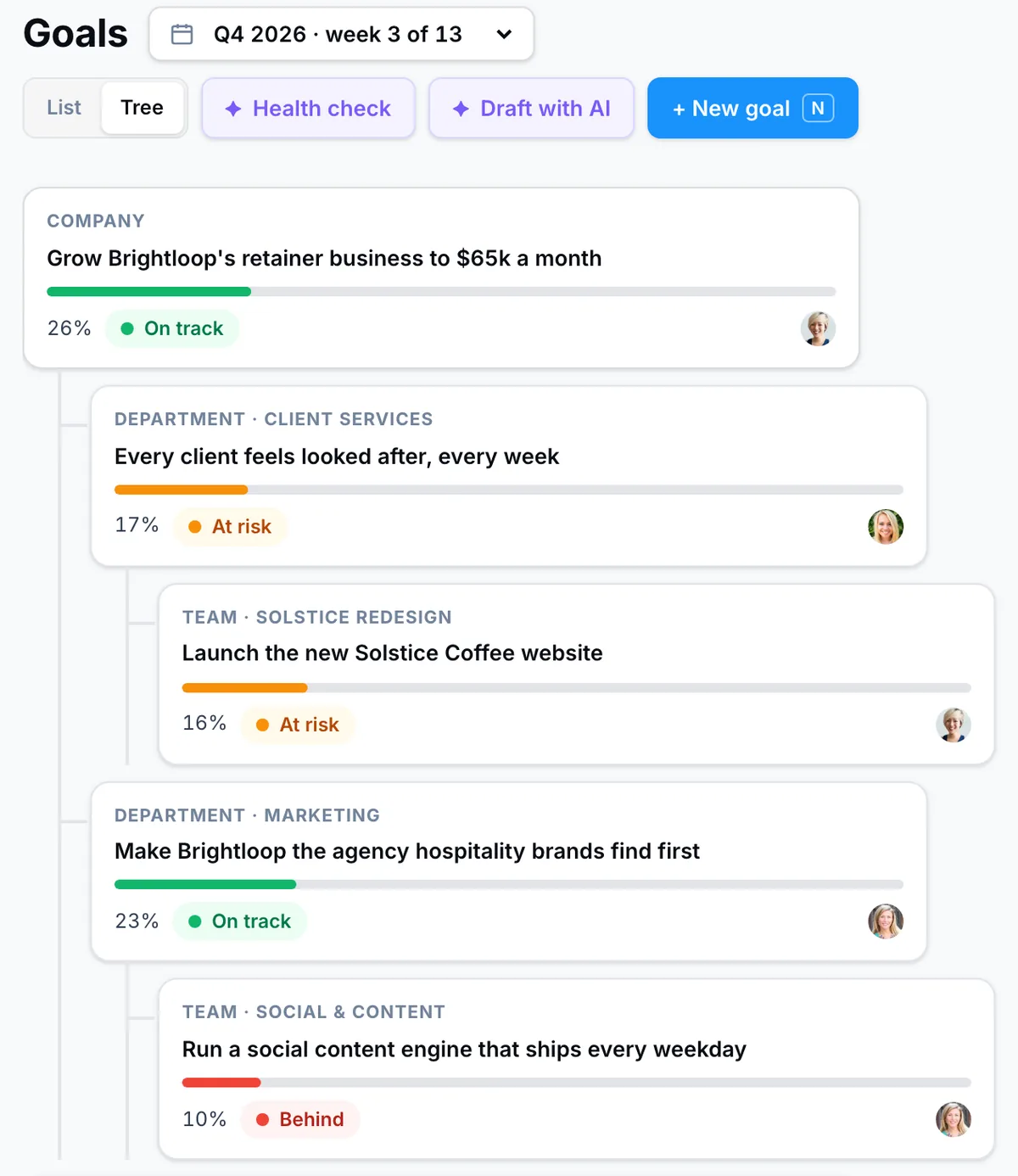
Goals & OKRs are on every paid plan, from Basic at $10 per user a month billed annually, which includes 20 AI goal drafts a month. Pro ($15) adds unlimited drafts, break-down of a company goal across teams, a goal health check and key results from connected tools. The free Starter plan does not include goals. The Monday brief and check-ins in chat come with the Lucy AI add-on ($20 per user a month on Pro and above). See Goals & OKRs and pricing.
For personal goals only, such as the half marathon above, the Lucy app turns a goal into a number and a plan on your phone; its free plan includes one goal.
Frequently asked questions
What is a good OKR example?
A good OKR has a plain-language objective and two to four key results, each with a start value, a target and a unit. For example: objective “Get paid on time”, key results “Days sales outstanding 58 → 40” and “Invoices more than 30 days overdue $140k → $50k”. “Launch the new invoicing tool” would be a task, not a key result.
How many OKRs should a team have?
Two to four objectives per team per quarter, each with two to four key results, is a common rule. Company OKRs are usually two to four as well. If a team cannot remember its OKRs without looking them up, it has too many.
What is the difference between a key result and a task?
A key result measures an outcome; a task is something you do. “Write 12 blog posts” is a task. “Organic sign-ups 120 → 200 a month” is the key result the blog posts are meant to move. Keep the tasks in a project and link the project to the key result.
Can OKRs be personal?
Yes. Personal OKRs can support a team key result or be entirely your own, such as learning a skill or a fitness goal. They work the same way: an objective and two or three numbers that prove you got there. In PeerBie, personal goals are private unless you choose to share them.
Where should key-result numbers come from?
From the place the number already lives: the CRM for pipeline and win rate, the billing system for revenue and churn, the issue tracker for engineering metrics, a spreadsheet for everything else, or a quick check-in by the owner. The fewer manual updates a key result needs, the longer it stays current.
Set this quarter’s OKRs from one sentence
Try PeerBie Pro with the Lucy add-on free for 14 days, no credit card needed, and turn any example on this page into a goal your team can measure. Or walk around the live demo workspace without signing up.
Examples are illustrative; the numbers are not benchmarks. Product details checked on peerbie.com on 22 October 2026. If you spot something out of date, tell us at [email protected].
