
AI Meeting Note-Takers for Zoom, Google Meet and Teams: What Works in Each
The best AI meeting note-taker depends less on the note-taker than on the meeting app. Zoom, Google Meet and Microsoft Teams each have their own built-in AI notes, their own licences, and since 2026 their own rules for letting a note-taking bot into the call. A tool that works perfectly in your own Zoom meetings can sit in a client’s Teams lobby until the call ends.
This guide goes platform by platform: what is built in and what it costs, how third-party note-takers get in, and which tools fit each one. Prices and licence terms were checked on each vendor’s own website on 22 October 2026 (some on 20 October; the notes say which). We make one of the tools here (Lucy, the AI assistant in PeerBie), and we say where others are stronger. If you are specifically replacing Otter, our Otter.ai alternatives guide compares nine tools head to head.
The short answer
- Mostly Zoom, and you already pay for Zoom: start with Zoom’s own AI summaries; add ZoomMate only if you need unlimited notes and task-tool connections.
- Mostly Google Meet on Business Standard or above: “Take notes for me” is already in your plan. On Business Starter it is not.
- Mostly Teams: AI recap needs Teams Premium or a Microsoft 365 Copilot licence. Without them, a third-party tool is cheaper.
- A mix of all three, including other companies’ calls: a cross-platform note-taker such as Otter, Fireflies, Fathom, tl;dv or Lucy.
- Bots are blocked or unwelcome: a bot-free recorder (Granola, Bluedot, Tactiq, Jamie, Krisp) or PeerBie’s web recorder, which records a browser call’s tab audio.
- You want the action items to become your team’s tasks: Fellow if your tasks live in Asana, Jira or Linear; Lucy in PeerBie if you want notes, tasks and follow-up in one place.
Three ways a note-taker records a meeting
| How it records | Examples | Good at | Watch out for |
|---|---|---|---|
| Built into the meeting app | Zoom AI, Gemini in Meet, Teams intelligent recap | Nothing extra to install or admit; covered by your existing licence | Works only in that app, and usually only when your company hosts the call; notes stay in the app or a document |
| A bot that joins as a participant | Otter, Fireflies, Fathom, tl;dv, Fellow, Lucy | Works across Zoom, Meet and Teams, including calls you do not host; the bot is visible to everyone | The host may need to admit it or allow recording; some companies block bots entirely |
| No bot: records your own device or browser | Granola, Bluedot, Tactiq, Jamie, Krisp, PeerBie web recorder | Nothing appears in the call; works when bots are blocked | Only works when you are in the call on that computer; you still need to tell people you are recording |
For a meeting in a room, a fourth way is your phone on the table: the Lucy app and Otter’s mobile app both record in-person meetings.
Zoom: built-in summaries, ZoomMate, and third-party bots
What Zoom includes
In 2026 Zoom renamed its AI. The features included in Zoom plans are now called Zoom AI, and the paid add-on is ZoomMate (it replaces the old Custom AI Companion add-on). On the free Basic plan you get meeting summaries for 3 hosted meetings a month. Paid Zoom Workplace plans include summaries for more meetings. ZoomMate costs $16.67 per user a month billed annually ($20 monthly) and adds unlimited AI note-taking, custom summary templates and connections to other tools; creating Asana tasks from a meeting, for example, is a ZoomMate feature.
Getting a third-party note-taker into Zoom
Bots join a Zoom call as a visible participant and usually ask the host for permission to record. If the host’s settings do not allow participants to record, many bots cannot take notes and leave. Zoom admins can also restrict apps and recording requests, and some organisations now block unapproved bots altogether. If you join a lot of other companies’ Zoom calls, expect the occasional bot to be turned away.
Best fits for Zoom
If your meetings are all Zoom and you pay for Zoom, the built-in summaries are the cheapest start. Add a third-party tool when you need the same notes in Meet and Teams too, a searchable archive across all of them, or action items that land in your task tool.
Google Meet: “Take notes for me” and the new guest-admit rules
What Google includes
Gemini’s “Take notes for me” writes the notes into a Google Doc in the organiser’s Drive, with a summary and a “Next steps” section that lists action items and who they were assigned to. It is part of Google Workspace Business Standard, Business Plus, Enterprise Standard and Enterprise Plus, and not part of Business Starter. It supports eight languages: English, French, German, Italian, Japanese, Korean, Portuguese and Spanish. The next steps stay in the document; we could not find a Google page saying they are sent to a task list.
Getting a third-party note-taker into Meet
A bot from outside your organisation joins Meet as a guest and has to be admitted, and if nobody lets it in within a few minutes it is usually dropped. Since spring 2026, Meet also sorts knock requests into two lists, and the requests it thinks need “a closer look” are set to deny unless the host lets them in. In practice: tell the host your note-taker is coming, or use a tool that does not need a bot.
Best fits for Meet
On Business Standard or above, try the built-in notes first. On Business Starter, or when you join other companies’ Meet calls, Chrome-extension recorders such as Tactiq and Bluedot need no bot at all, and tl;dv can record Meet with or without one. For how-to tips on writing notes yourself, see meeting notes in Google Docs.
Microsoft Teams: Premium, Copilot and the bot lobby
What Microsoft includes
Plain Teams has no AI notes. Intelligent recap (AI notes, tasks and chapters after the meeting) needs Teams Premium, at $10 per user a month paid yearly, or a Microsoft 365 Copilot licence. Facilitator, which takes live AI notes during the call, needs a Copilot licence; Teams Premium alone does not include it. Facilitator does not work in meetings with external participants and handles one spoken language per meeting. Copilot Business, for companies with up to 300 users, lists at $21 per user a month paid yearly (on offer at $18 for the first year until 31 December 2026); Microsoft 365 Copilot for larger companies is $30.
Getting a third-party note-taker into Teams
Teams now detects external meeting bots and holds them in the lobby, whatever the meeting’s lobby settings say, until the organiser admits them, with a warning that the participant may be a bot. That is the default; tenant admins can switch it to allow bots, and Microsoft says some bots are not detected. Bots and Copilot registered inside your own company are not affected. Expect to admit your note-taker by hand in other companies’ Teams calls, and expect some companies to refuse.
Best fits for Teams
If you already have Copilot, use Facilitator and recap for internal meetings. If you would buy Premium or Copilot only for notes, a third-party note-taker usually costs less, and it also covers your Zoom and Meet calls. More on the Microsoft side in task management in Microsoft 365.
Cross-platform AI note-takers compared
| Tool | Zoom · Meet · Teams | How it records | Free plan | Paid from (per user / month) | Action items go to… |
|---|---|---|---|---|---|
| Otter.ai | All three | Bot; mobile app in the room | 300 min/month | $8.33 annual (Pro) | Asana, Jira and others through integrations |
| Fireflies | All three | Bot | Yes; 400 min of storage per team | $10 annual, $18 monthly (Pro) | Asana, Jira, Linear integrations |
| Fathom | All three | Bot | Unlimited recordings and transcripts | $16 annual, $20 monthly (Premium) | CRM and Asana; action items on paid plans |
| tl;dv | All three | Bot; Meet also without a bot | 10 meetings with AI notes | $18 annual (Pro) | Asana, Jira, ClickUp, Notion, monday.com |
| Fellow | All three | Bot or desktop app | 5 AI notes in total, up to 5 users | $7 annual, $11 monthly (Team) | Asana, Jira, ClickUp, monday.com, Linear, with assignees and due dates |
| Granola | Any app | No bot; your computer’s audio (Mac, Windows) | Yes, 30-day history | $14 (Business) | Notion, HubSpot, Attio, Zapier |
| Bluedot | All three, plus Webex | No bot; Chrome extension or desktop app | 5 meetings in total | $20 annual, $25 monthly (Pro) | Notion, Slack, HubSpot, Salesforce, Zapier |
| Tactiq | All three, in the browser | No bot; Chrome extension | 10 transcripts/month | $8 annual (Pro) | Linear, HubSpot, Slack workflows |
| Notta | All three, plus Webex | Bot or no bot | 120 min/month, 3 min per recording | $8.17 annual (Pro) | Notion, HubSpot, Salesforce, Zapier |
| Jamie | Any app | No bot | 10 notes/month, 30-min meetings | $24 annual (Plus) | Asana, Salesforce, HubSpot on Pro |
| Krisp | Any app | No bot by default; bot optional | 7-day trial | $8 annual, $16 monthly (Core) | Notion, HubSpot, Salesforce, Zapier |
| Lucy (PeerBie) | All three | Silent bot from your calendar; web recorder for browser calls; Lucy app in the room | Lucy app: 120 min/month of your own recordings (the bot is on Pro and Max) | Lucy app Pro $9.99; in PeerBie, $20 add-on on Pro | PeerBie tasks with an owner and a due date, after you check them |
Bot or no bot: what to tell the people in the call
A bot-free recorder is not a secret recorder. It still captures what everyone says, and recording rules differ by country and state; some require everyone’s consent. Whatever you use, say at the start that you are taking AI notes, let people object, and check your company’s policy. A visible bot such as “Lucy (notes)” at least makes the recording obvious to everyone. For the wider how-to, see how to use AI for meeting notes.
How Lucy works in Zoom, Meet and Teams
Lucy is the AI assistant in PeerBie, and also a personal app. She works the same way in all three meeting apps, and when a bot cannot get in she has a way around it.
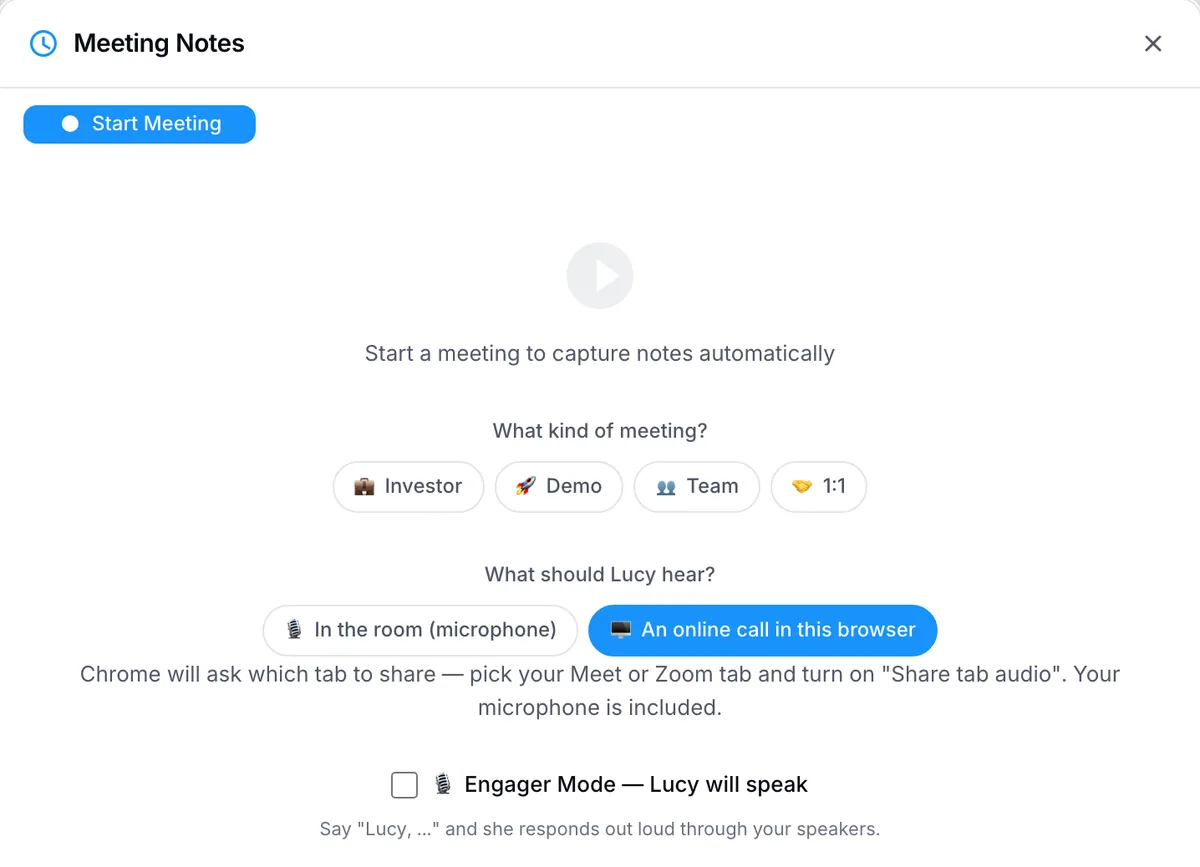
- One switch for every meeting app. Connect your Google or Outlook calendar and Lucy’s note-taker joins the Zoom, Google Meet and Teams meetings on it: all of them, only the ones you switch on, or a link you paste. She joins as “Lucy (notes)”, says nothing, and tells you when she is waiting to be admitted, which matters now that Meet and Teams hold bots back.
- No bot when bots are blocked. PeerBie’s web recorder captures a browser call’s tab audio and your microphone, in Chrome or Edge on a computer, so you get the same notes from a client’s call that refuses bots.
- In the room. The Lucy app records on your phone. It is on Google Play; the iPhone app is coming soon to the App Store.
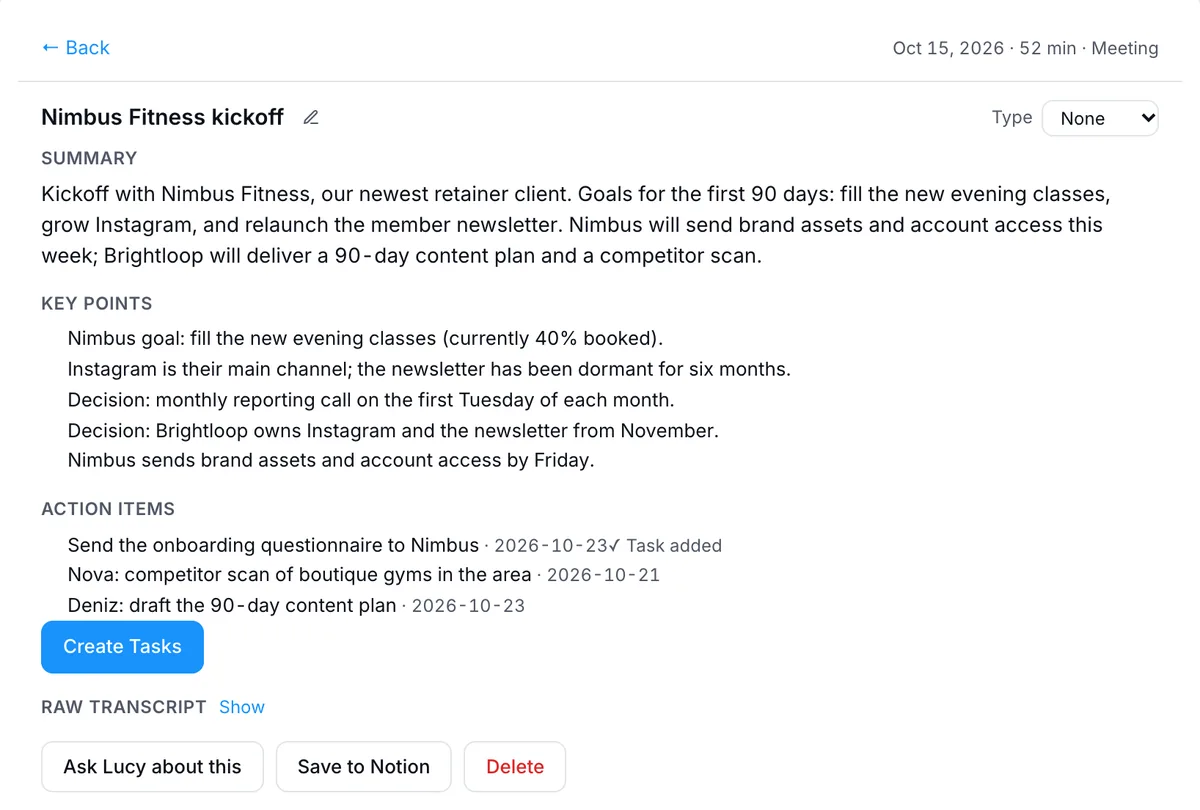
- Notes become tasks. Summary, decisions and action items land on PeerBie’s Notes & meetings page, with owners and dates taken from what was said. You check them, and one click turns them into tasks your team can see. The next morning Lucy’s brief shows what is due, and she drafts the recap email for your OK. See meetings in PeerBie.
What it costs. In PeerBie, the note-taker comes with the Lucy AI add-on, $20 per user a month on Pro and above, with no credits; creating Zoom, Meet and Teams meetings from PeerBie is on every plan. For one person, the Lucy app is free for 120 minutes a month of your own recordings; the note-taker that joins Zoom, Meet and Teams calls is on Pro ($9.99 a month or $79.99 a year) and Max ($19.99), and in the 7-day Pro trial.
Where your data goes. PeerBie is hosted in Germany. The note-taker uses Recall.ai and the notes are written by AI providers in the US, so meeting audio and text are processed there. Audio can be played back for 30 days; the notes and transcript stay. We do not use your data to train AI models. Details on our security page.
Where Lucy is weaker
- No desktop app. Granola, Bluedot and Krisp record any app on your computer without a bot; PeerBie’s web recorder works only for calls in a Chrome or Edge tab.
- The team note-taker is not free. It needs the Lucy add-on on Pro. Fathom’s free plan records unlimited meetings.
- Lighter on sales features. Fireflies and similar tools go further on call analytics and CRM updates.
- Tasks land in PeerBie. If your team will stay in Asana or Jira, Fellow’s hand-off to those tools is the better fit.
- No video calls of our own. PeerBie books Zoom, Meet and Teams meetings; its Huddles are audio rooms with screen share.
How to choose in five questions
- Which meeting app hosts most of your calls, and do you already pay for its AI notes?
- How many of your calls are hosted by other companies, whose rules decide whether a bot gets in?
- Do you need a bot-free option for sensitive calls?
- Which languages are spoken in your meetings? Built-in tools support fewer than most third-party note-takers.
- Where should the action items end up, and who makes sure they get done?
See PeerBie pricing for every plan.
Frequently asked questions
Which AI note-taker works with Zoom, Google Meet and Microsoft Teams?
Most third-party note-takers cover all three, including Otter, Fireflies, Fathom, tl;dv, Fellow and Lucy, which join as a bot. Bot-free tools such as Granola, Jamie and Krisp record your computer’s audio, so they work with any meeting app. The built-in options (Zoom AI, Gemini in Meet, Teams intelligent recap) each work only in their own app.
Do I need Copilot for AI meeting notes in Teams?
For Microsoft’s own AI notes you need Teams Premium or Copilot. Intelligent recap needs Teams Premium ($10 per user a month paid yearly) or a Microsoft 365 Copilot licence; live notes with Facilitator need Copilot. Without either, a third-party note-taker can take notes in Teams, but in other companies’ meetings it usually has to be admitted from the lobby.
Does Google Meet take notes on Business Starter?
No. Gemini’s “Take notes for me” is included in Google Workspace Business Standard, Business Plus, Enterprise Standard and Enterprise Plus, not in Business Starter. On Starter you can use a third-party note-taker or a bot-free Chrome extension.
Is there a free AI note-taker for Zoom?
Zoom’s free Basic plan includes AI meeting summaries for 3 hosted meetings a month. Third-party free plans include Fathom (unlimited recordings and transcripts), Otter (300 minutes a month) and tl;dv (10 meetings with AI notes). The Lucy app’s free plan covers 120 minutes a month of your own recordings; its Zoom note-taker is on the paid plans and the 7-day trial.
Can a meeting host stop AI note-taking bots from joining?
Yes. In Teams, external bots are held in the lobby by default and admins can block them; in Google Meet, external guests including bots must be admitted; in Zoom, hosts can refuse recording permission and admins can restrict apps. Respect the host’s choice: ask before the call, or take notes another way.
Try it in your own meetings
Try PeerBie Pro with the Lucy add-on free for 14 days, no credit card needed; the note-taker is included in the trial. Or walk around the live demo workspace without signing up. Just for yourself? Start the Lucy app’s 7-day Pro trial.
Prices and licence terms checked on each vendor’s website on 20–22 October 2026. Meeting apps change their AI plans and bot rules often; if you spot something out of date, tell us at [email protected].
