
Otter.ai Alternatives: 9 AI Note-Takers Compared, and Which Ones Follow Up
Otter.ai made AI meeting notes mainstream, and it is still a solid choice. People look for an alternative for a few recurring reasons: the monthly minute caps, a bot that joins calls guests did not expect, support for six languages, and notes that stop at a summary when what you really need is for someone to do the work.
This guide compares nine alternatives on one practical question: after the meeting, does each action item become an assigned task with an owner and a due date, in the place your team works? Prices were checked on each vendor’s own website on 20 October 2026. We make one of the tools on the list (Lucy, the AI assistant in PeerBie), and we say where others are stronger.
The short answer
- Best free plan: Fathom (unlimited recordings and transcripts on the free plan).
- No bot in the call: Granola (Mac and Windows) or Krisp.
- Action items into Asana, Jira or Linear with owners and due dates: Fellow.
- Sales teams on a CRM: Fireflies or Read.ai.
- Already paying for Zoom, Google Workspace or Microsoft 365 with Copilot: try the built-in notes first.
- Notes that become your team’s tasks and get followed up the next morning: Lucy in PeerBie, or the Lucy app for one person.
Why people look beyond Otter
To be fair to Otter first: its free plan joins Zoom, Google Meet and Microsoft Teams calls, Pro is one of the cheapest paid plans ($8.33 per user a month billed annually, $16.99 monthly), and it now has an MCP server and integrations with Asana, Jira, Salesforce, HubSpot and Slack. The common reasons to switch:
- Minute caps. Basic gives 300 transcription minutes a month and Pro 1,200, with no rollover. People in back-to-back meetings run out.
- The bot. OtterPilot joins as a participant. Some guests dislike it, and some companies block meeting bots.
- Languages. Otter transcribes six languages (English, Spanish, French, German, Japanese and Chinese), one per conversation.
Nine Otter alternatives compared
| Tool | Free plan | Paid from (per user / month) | How it records | Action items become tasks in… |
|---|---|---|---|---|
| Otter.ai (baseline) | 300 min/month | $8.33 annual, $16.99 monthly (Pro) | Bot joins Zoom, Meet, Teams | Asana, Jira and others through integrations |
| Fireflies | Yes; 400 min of storage per team | $10 annual, $18 monthly (Pro) | Bot | Asana, Jira, Linear integrations; check owner and date mapping |
| Fathom | Unlimited recordings and transcripts | $15 annual (Team, 2+ users), $16 (Premium) | Bot | Asana, HubSpot, Salesforce; action items on Premium |
| Granola | Yes, 30-day history | $14 (Business) | No bot; records your device audio (Mac and Windows) | Notion, HubSpot, Attio, Zapier; no native Asana or Jira |
| Read.ai | 5 meetings/month | $15 annual, $19.75 monthly (Pro) | Bot, plus desktop and mobile apps | Jira, Notion, Confluence, Salesforce, HubSpot on Pro |
| Fellow | 5 AI notes in total, up to 5 users | $7 annual, $11 monthly (Team) | Bot or desktop app | Asana, Jira, ClickUp, Trello, monday.com, Linear, with assignees and due dates |
| Zoom AI Companion | Limited on Zoom Basic | Included with paid Zoom plans | Built into Zoom | Summary and next steps; no documented task-tool push |
| Gemini in Google Meet | No | Included in eligible Workspace plans | Built into Meet | “Next steps” in a Google Doc |
| Microsoft Teams recap | No | Teams Premium or Microsoft 365 Copilot (Copilot Business $21 list) | Built into Teams | AI-recommended tasks in the recap |
| Lucy (PeerBie) | Lucy app: 120 min/month of your own recordings; joins calls on Pro and Max | Lucy app Pro $9.99; in PeerBie, $20 add-on on Pro | Silent bot for Zoom, Meet, Teams; phone recording; web tab recorder | PeerBie tasks with owner and due date, after you check them |
The alternatives, one by one
Fireflies: strong search and CRM workflows
Fireflies joins your calls, transcribes them and makes every meeting searchable. Pro is $10 per seat a month billed annually ($18 monthly), Business $19 ($29 monthly). The free plan transcribes but keeps only 400 minutes of storage per team. It connects to Asana, Jira and Linear, and Asana tasks can be created from its action items.
Pick it if you want a searchable archive of every call and CRM updates. Check whether owners and due dates come through to your task tool.
Fathom: the most generous free plan
Fathom’s free plan includes unlimited recordings and transcripts with AI summaries. Paid plans add action items, CRM sync and team features: Premium $16 a month billed annually, Team $15 per user for 2+ users, Business $25. It records in 38 languages.
Pick it if you want to stop counting minutes. Note that action items and most integrations are on paid plans.
Granola: no bot in the meeting
Granola runs on your Mac or Windows computer and listens to the device audio, so nobody sees a bot. You type rough notes and it fills them in. It keeps transcripts, not audio. Basic is free with a 30-day history; Business is $14 per user.
Pick it if bots are not welcome in your calls. The trade-off: it lives on one person’s computer, and it has no native Asana or Jira connection.
Read.ai: meetings plus email and chat summaries
Read.ai summarizes meetings and can also cover email and messages. The free plan covers 5 meetings a month; Pro is $15 per user a month billed annually ($19.75 monthly) and adds Jira, Notion, Confluence, Salesforce and HubSpot.
Fellow: the best fit for task-tool hand-offs
Fellow is built around meeting agendas and follow-through. It documents action items with due dates and several assignees and syncs them to Jira, Asana, ClickUp, Trello, monday.com and Linear on the Team plan and up. Team is $7 per user a month billed annually ($11 monthly), Business $15.
Pick it if your tasks live in one of those tools and you want them to stay there. This is the strongest answer on our list for teams that will not change task tools.
The note-takers you may already pay for
- Zoom AI Companion summarizes meetings and lists next steps. Free Zoom Basic users get it for a few meetings a month; it is part of paid Zoom plans.
- Gemini “Take notes for me” in Google Meet writes notes with next steps into a Google Doc, in eligible Google Workspace editions (Business Standard and above), and supports eight languages.
- Microsoft Teams intelligent recap needs Teams Premium or a Microsoft 365 Copilot licence. Copilot Business, for companies with up to 300 users, lists at $21 per user a month.
These are the cheapest option if you already pay for the plan, and they need no extra bot. Their limit: notes stay in the meeting app or a document. Nobody is assigned anything unless someone copies it across.
How Lucy does it
Lucy is the AI assistant inside PeerBie, and also a personal app. We built her around the step most note-takers leave to you: making sure the work gets done.
1. She joins the meetings you choose
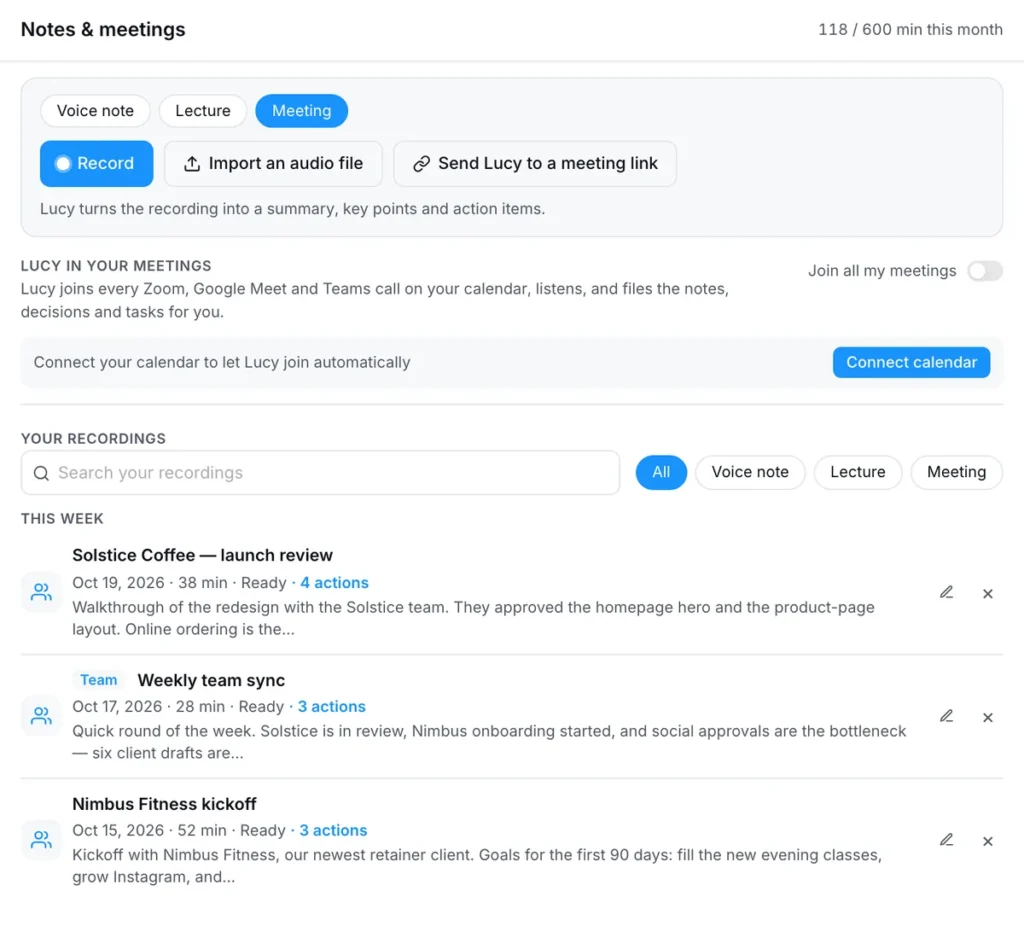
Connect your Google or Outlook calendar and Lucy’s note-taker joins your Zoom, Google Meet and Microsoft Teams meetings: all of them, only the ones you switch on, or a link you paste. She joins as “Lucy (notes)”, says nothing, and tells you if she is stuck in a waiting room so you can let her in.
2. Notes become tasks, with owners and dates
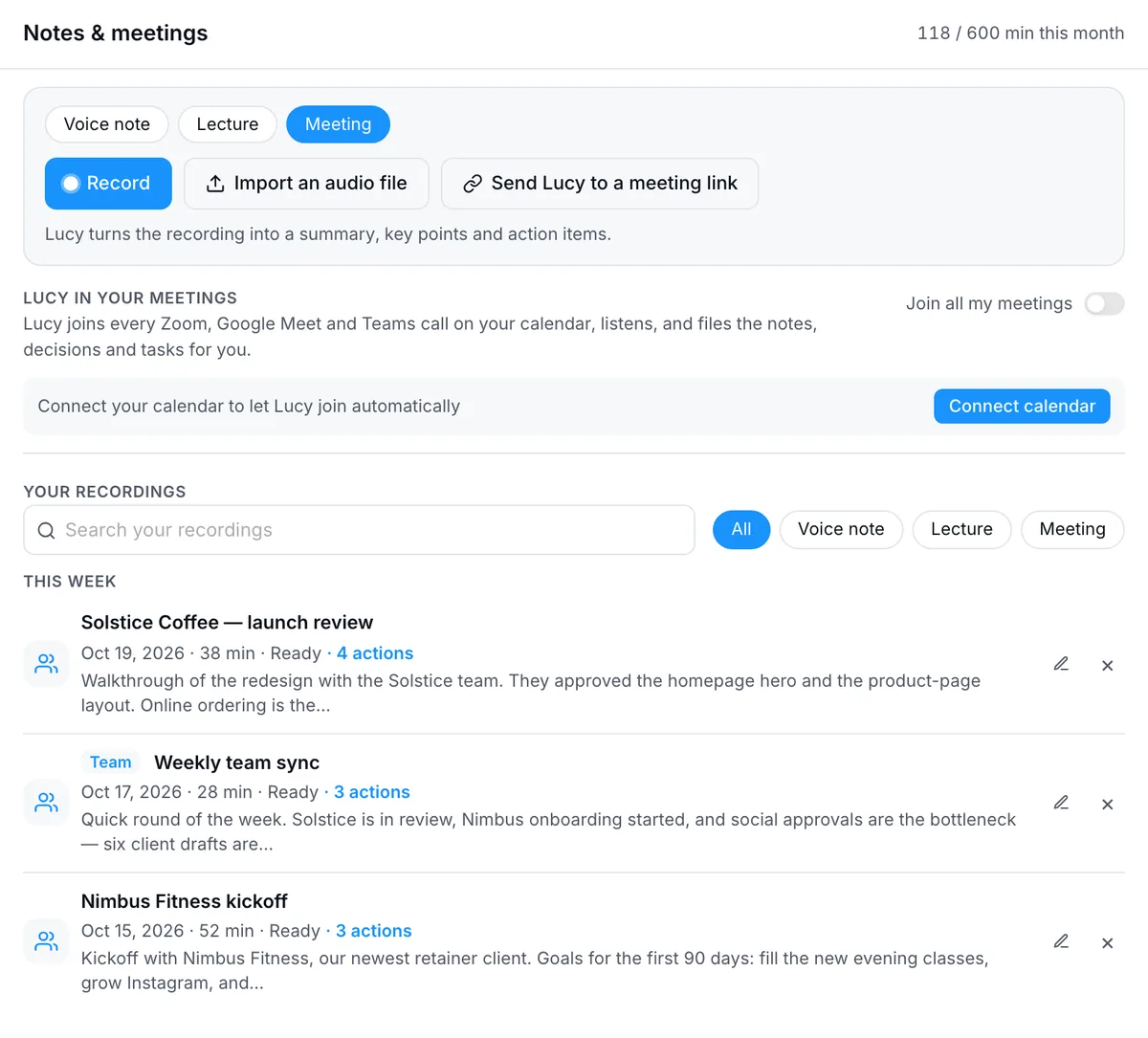
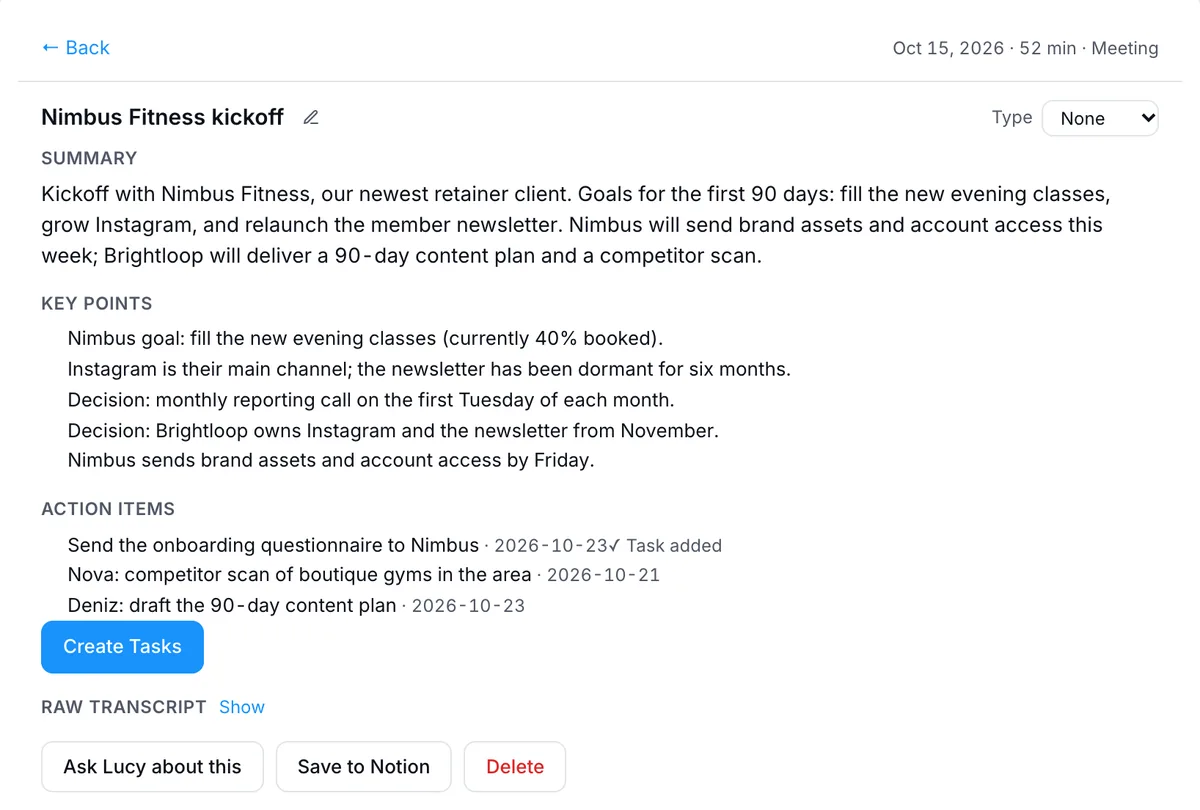
When the call ends, the summary, decisions and action items appear on the Notes & meetings page in PeerBie. Lucy takes the owner and the date from what was said; you check them, and one click turns them into PeerBie tasks your team can see, with reminders and comments. See how meetings work in PeerBie.
3. She follows up
The next morning, Lucy’s brief tells you what is due and what slipped. You can ask “What did we promise Dana?” weeks later, or ask her to draft the recap email from the notes; she waits for your OK before anything is sent.
4. Calls without a bot, and meetings in the room
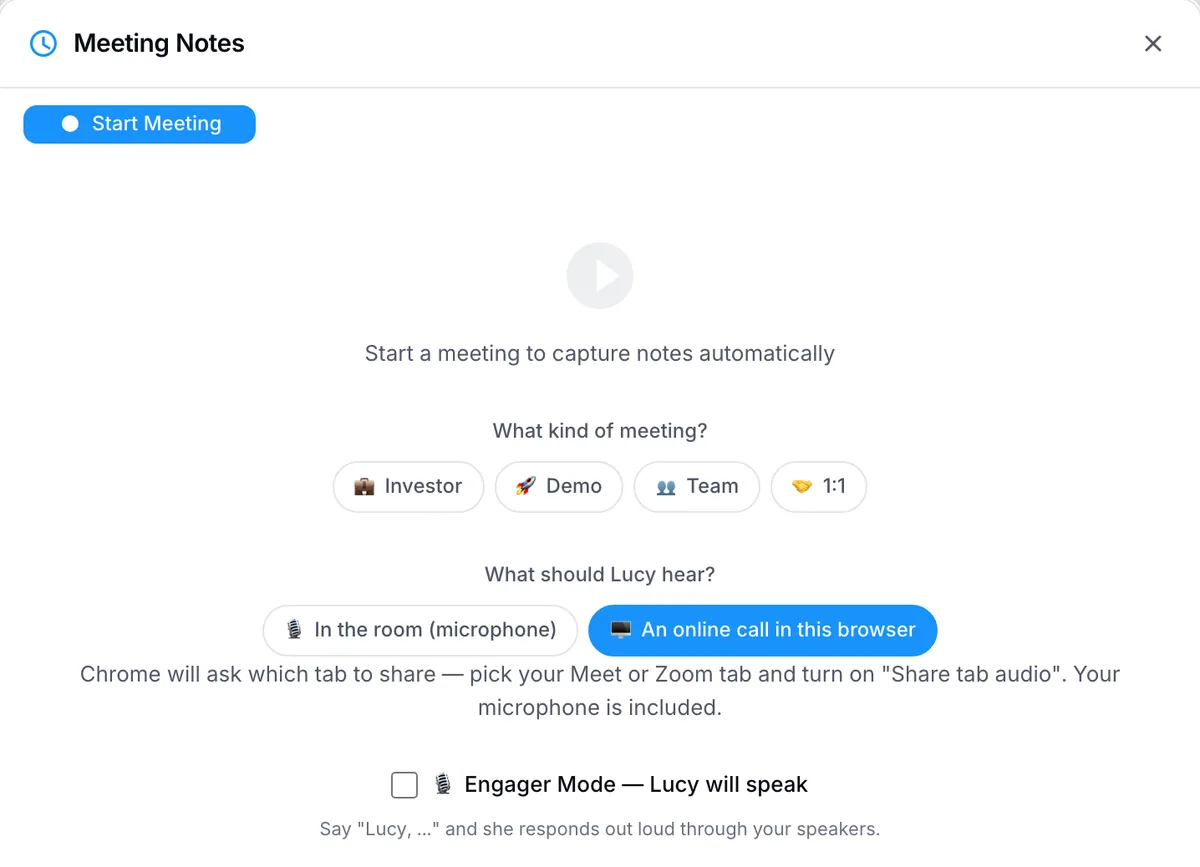
For a call in any web app, PeerBie’s web recorder captures the browser tab’s audio and your microphone (Chrome or Edge on a computer). For a meeting around a table, record on your phone with the Lucy app, which transcribes 40+ languages.
What it costs
Inside PeerBie, the note-taker comes with the Lucy AI add-on: $20 per user a month on the Pro plan and above (Pro itself is $15 billed annually), together with Lucy and AI employees, with no credits. For one person, the Lucy app is free to start, with 120 transcription minutes a month for recordings you make yourself. The note-taker that joins your Zoom, Meet and Teams calls comes with Pro at $9.99 a month (600 minutes) or Max at $19.99 (1,500 minutes), and you can try it in the 7-day Pro trial. See PeerBie pricing.
Where Lucy is weaker
- Your tasks need to be in PeerBie. If your team lives in Jira or Asana and will not move, Fellow fits better.
- No desktop app. Bot-free recording works through the web recorder in Chrome or Edge, not in desktop Zoom or Teams apps. Granola and Krisp are better if bots are a firm no.
- The Lucy app is on Android today; the iPhone app is coming soon to the App Store.
- Fewer sales features. Fireflies, Fathom and Read.ai have deeper call coaching and CRM sync.
- AI processing happens in the US. PeerBie is hosted in Germany, but transcription and the meeting bot use US providers. Our security page lists each one.
Consent: the part every tool shares
Every note-taker records people, and recording laws differ by country and state; some require every participant’s consent. Whichever tool you choose:
- Say at the start that the meeting is being recorded and why.
- Let anyone opt out, and stop the recording if they do.
- Prefer a visible note-taker (or tell people about a bot-free one).
- Check your company policy and how long the tool keeps audio and transcripts.
How to choose in five minutes
- Where should the action items end up? Pick the note-taker that writes into that place with an owner and a date.
- Bots or no bots? If no, shortlist Granola, Krisp or your meeting app’s built-in notes.
- How many hours of meetings a month? Compare against the minute caps.
- Which languages? Check the vendor’s list for every language your team speaks.
- What do you already pay for? Zoom, Workspace or Copilot may already include notes.
Frequently asked questions
What is the best free alternative to Otter.ai?
For unlimited free recordings, Fathom: its free plan includes unlimited recordings and transcripts, with some AI features on paid plans. If you already pay for Zoom, Google Workspace Business Standard or Microsoft 365 with Copilot, try the note-taking built into your meeting app first. Otter’s own free plan gives 300 minutes a month.
Which AI note-taker works without a bot joining the call?
Granola and Krisp record from your computer’s audio, so no bot appears in the meeting. Zoom, Google Meet and Teams have built-in note-taking that also needs no bot. PeerBie’s web recorder captures a browser call’s tab audio and your microphone without a bot, in Chrome or Edge.
Which note-taker turns action items into tasks with owners and due dates?
Fellow documents this most clearly for Asana, Jira, ClickUp, monday.com, Trello and Linear. Otter, Fireflies, Fathom and Read.ai send action items to some task tools, but check whether the owner and due date carry over. Lucy creates the tasks inside PeerBie with an owner and a due date after you check them.
Is it legal to record meetings with an AI note-taker?
Recording rules differ by country and state, and some require everyone’s consent. Whatever tool you use, tell participants at the start, let them object, and check your company’s policy. A visible bot (such as “Lucy (notes)” or OtterPilot) at least makes the recording obvious.
How much does Lucy cost compared with Otter?
The Lucy app is free to start (120 minutes a month), Pro is $9.99 a month or $79.99 a year, and Max is $19.99 a month. The free plan covers recordings you make yourself; the note-taker that joins Zoom, Meet and Teams calls is on Pro and Max, and in the 7-day Pro trial. Inside PeerBie, Lucy is a $20 per user monthly add-on on the Pro plan. Otter Pro is $8.33 per user a month billed annually or $16.99 monthly.
See your next meeting turn into tasks
Start PeerBie for free and try Pro with the Lucy add-on in the 14-day trial, or get the Lucy app for yourself.
Prices and features checked on each vendor’s website on 20 October 2026. If something has changed, tell us at [email protected].
