
Your AI Chief of Staff. And a team that does the work.
Lucy runs your email, calendar, meeting notes and follow-ups inside PeerBie. AI employees take on whole roles — they propose work every morning and do it once you approve.
Lucy AI add-on: $20 per user a month on Pro and above
- 10:00 Northwind call on Zoom — I’ll take notes. Dana is waiting on the revised quote.
- “QA checklist” is 2 days late. It supports your goal “Launch the new website”.
- Skyler has 3 launch posts ready for your OK.
To Dana: “Hi Dana, the revised quote is attached — happy to walk through it on tomorrow’s call.”
One assistant across your whole workday.
Lucy knows your workspace, your role and your goals. Ask in chat or by voice — she does the work in PeerBie and in the tools you connect.
Chat
Ask for anything — tasks, projects, posts, messages to your team. Lucy does it, not just describes it.
Reads Gmail and Outlook, drafts replies for you to send and turns requests into tasks.
Calendar
Checks Google or Outlook calendars, finds a time and books Zoom, Meet or Teams calls.
Meetings
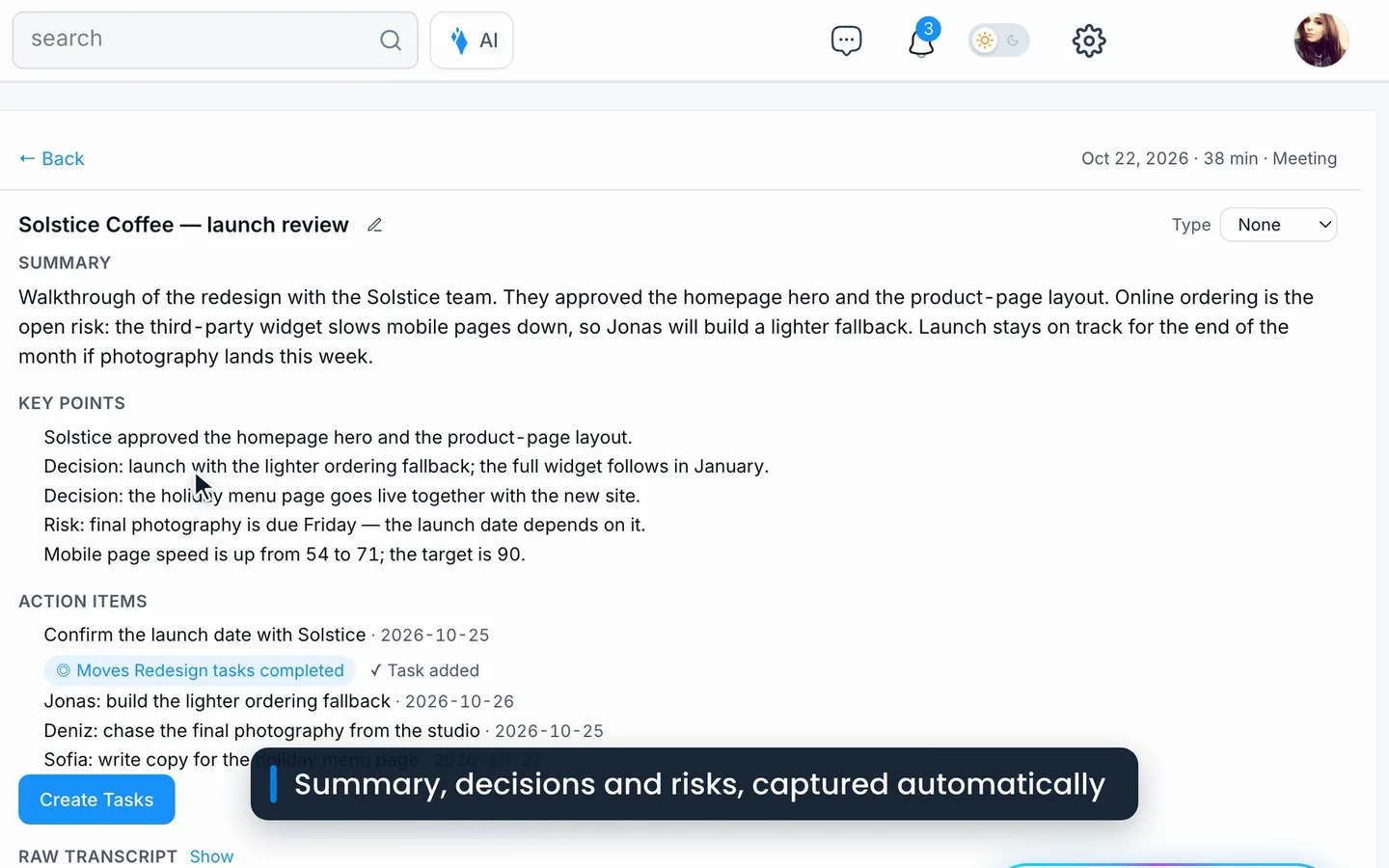
A silent note-taker in your calls. Decisions and action items land as tasks with owners.
Goals
Drafts goals and key results from one sentence, records check-ins in chat and flags what’s slipping.
Documents
Writes Word, PDF and Google Docs from your projects, goals and notes.
Files
Reads Google Drive, OneDrive and SharePoint files and answers questions about them.
Voice
Talk to Lucy instead of typing, and she joins Huddles to talk with your team and take notes.
The cards show example content.
Away from your desk? Your digital twin answers.
Create your digital twin in PeerBie messaging and let it answer colleagues’ questions for you — based on what you’ve shared in PeerBie. And choose how much help you want in every chat.
Lucy suggests replies. You pick one, edit it and send.
Turn it on and the AI replies on your behalf.
Already use Claude or ChatGPT? Bring PeerBie along.
The PeerBie connector lets Claude and ChatGPT read and update your tasks, projects and goals. PeerBie is listed in Claude’s connector directory; in ChatGPT it works through developer mode.
- Ask about your work from the assistant you already use.
- Start a PeerBie workflow straight from Claude.
- Signed in as you — it works with your account and your permissions.
From what was said to what got done.
Meetings, email and chat
Lucy takes the notes, reads the threads and keeps track of what people promised.
Proposals, not surprises
Tasks, replies and posts arrive as drafts. Approve, edit or dismiss in one click.
With a record
The work happens in PeerBie and your tools, and every action is a task you can open.
Built to be trusted with your inbox.
Lucy works with your email, calendar and files, so we hold her to the standards Google and Microsoft check.
An independent security assessment, plus Google’s OAuth verification.
For Outlook, Teams, OneDrive and SharePoint.
Your Google and Microsoft connections are stored encrypted.
Sign in through your identity provider and keep users in sync.
Available to everyone, and admins can require it for the workspace.
Sensitive actions wait for a person, and every action leaves a record.
Where your data is: PeerBie is hosted in Germany (EU). The AI features use providers based in the US (Google Gemini and OpenAI, and Recall.ai for meeting notes), so content you send to Lucy is processed there.
One add-on. Your whole AI team.
Lucy and every AI employee you hire come with the Lucy AI add-on. No credits, no per-agent fees.
The add-on is available on Pro and Enterprise, not on Basic or Free. Pro is $19 a month when billed monthly. 14-day free trial. Just for yourself? The Lucy app, Lucy’s personal mobile app, has its own plans.
“PeerBie brought order and clarity to our development process and aligned our teams to deliver on time — letting me focus on the big picture.”
Questions about Lucy and AI employees.
What is the difference between Lucy and AI employees?
Lucy is your AI Chief of Staff: one assistant for everyone, who handles email, calendar, meetings, tasks, goals and documents when you ask. AI employees are specialists you hire for a role, such as a social media manager, who propose work each morning and act after you approve.
How much does it cost?
The Lucy AI add-on is $20 per user a month on Pro and above. It includes Lucy and all your AI employees, with no credits or per-agent fees. With Pro at $15, that is $35 per user a month billed annually.
Does the AI act without asking?
AI employees propose work and wait for your approval, and drafts come to you before anything is posted or sent. Lucy asks before sensitive actions such as sending an email or deleting a task. Every action becomes a task, so you can see what was done.
Which tools can Lucy and AI employees use?
30+ integrations with real actions, including Gmail, Outlook, Google Calendar, Drive, Docs and Sheets, OneDrive, SharePoint, Teams, Slack, Zoom, HubSpot, Salesforce, Pipedrive, Notion, Asana, Linear, GitHub, LinkedIn, Instagram and X.
Which meeting tools does the note-taker join?
Zoom, Google Meet and Microsoft Teams calls on your calendar. Lucy can also create those meetings for you, and she and your AI employees join PeerBie Huddles, the audio rooms with screen share.
What is a digital twin?
A messaging feature: create your digital twin and it answers colleagues’ questions for you, based on what you have shared in PeerBie. In any chat you can also use Copilot, which suggests replies, or Autopilot, which replies for you.
Can I use PeerBie from Claude or ChatGPT?
Yes. The PeerBie connector is listed in Claude’s connector directory and works in ChatGPT through developer mode. It reads and updates your tasks, projects and goals with your permissions.
Is the Lucy app the same thing?
The Lucy app is a personal mobile app that records meetings and voice notes and turns them into tasks. Lucy inside PeerBie is for teams. When you invite someone from the Lucy app, it becomes a PeerBie workspace.
Meet Lucy in your own workspace.
Start free, or walk around the live demo first. Add Lucy and your AI team on Pro whenever you’re ready.